What should a technical SEO checklist for a B2B website cover?

Technical SEO for a B2B website comes down to seven things. Google can crawl the pages that matter. It indexes the right version of each one. It finds them through a clean XML sitemap. It understands which page serves which language and market. Everything is served over HTTPS, with the full content on mobile. Real users get a fast, stable page, measured as Core Web Vitals. Get all of that right and your content gets a fair chance. Break one part and the best article on your site can stay invisible.
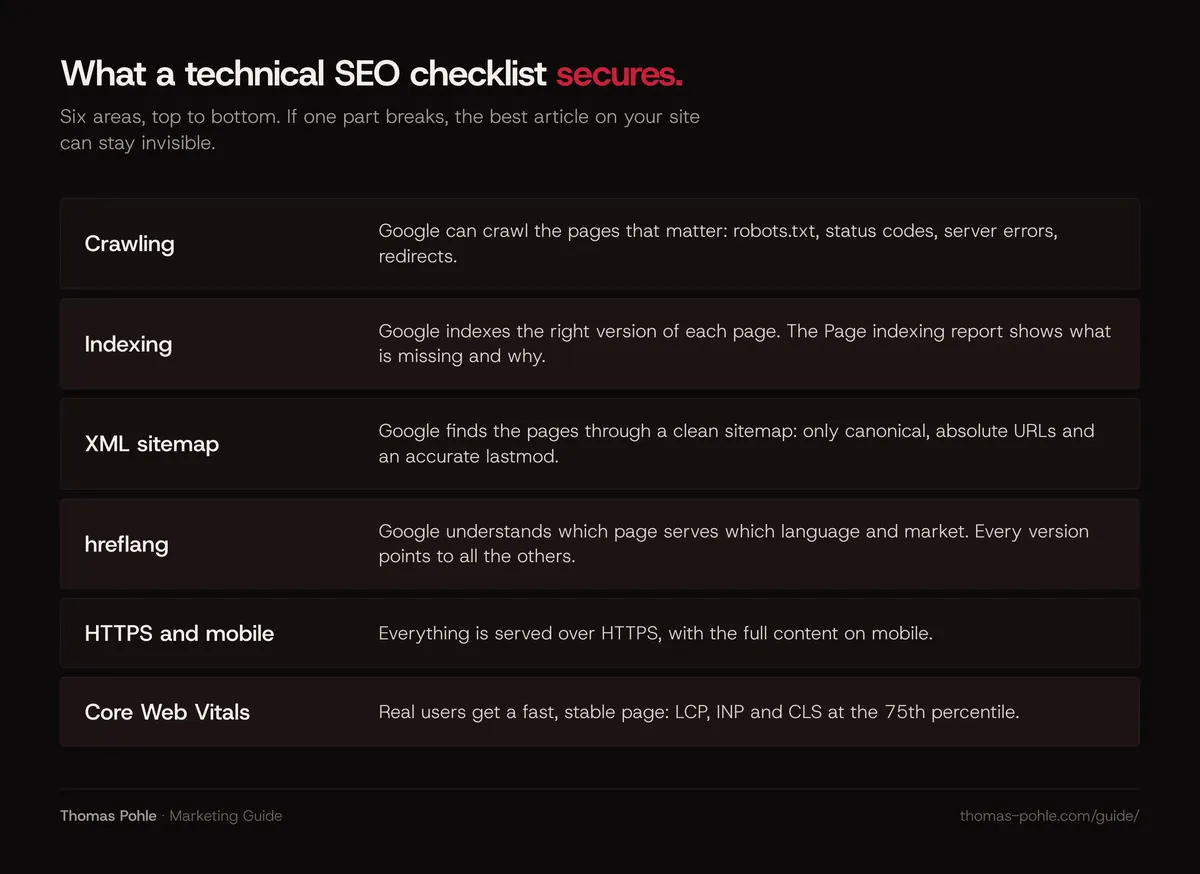
Below is each area with what Google documents today. Then a checklist table to work through this week.
Why does technical SEO matter so much for B2B websites?
Most B2B sites are small. A few service pages, a case study section, a blog, maybe a resources area with PDFs. Every page carries more weight than on a large publisher site. One wrong noindex on a service page or one broken redirect after a relaunch costs real pipeline.
Technical SEO is also the entry ticket for AI search. Google states that to appear as a supporting link in AI Overviews or AI Mode, a page must be indexed and eligible to be shown in Google Search with a snippet, and that there are no additional technical requirements. So the same basics decide whether you show up in classic results and in AI answers. For the bigger picture, read what answer engine optimization is and how it relates to SEO.
Can Google crawl your important pages?
Crawling comes first. Check three things before anything else.
- robots.txt. It tells crawlers which URLs they may request. Google is explicit that robots.txt isn't a mechanism for keeping a page out of Google. A blocked URL can still appear in results, without a description, if other sites link to it. To keep a page out of the index, use
noindexor password protection. - Status codes. Your important pages must return 200. Pages that return a 4xx code are removed from the index over time. Pages that return 200 but look empty or like an error page are reported as soft 404s in Search Console.
- Server errors. When your server returns 5xx errors or 429, Google's crawlers slow down. URLs that keep returning server errors are eventually dropped from the index. Hosting struggles? Fix that before you write more content.
Check redirects separately, especially after a relaunch or a domain change. Google treats a 301 (and 308) as a strong signal that the target should be processed, and a 302 (and 307) as a weak signal. Googlebot generally follows up to 10 redirect hops. My rule of thumb: one hop from every old URL to its new home, and 301 for anything permanent.
Are the right pages indexed?
Open the Page indexing report in Google Search Console. It shows which URLs Google has indexed and why others aren't. Google says plainly that you shouldn't expect every URL on your site to be indexed. Fine for tag pages and filtered views. A real problem when a service page or a key case study is missing.
The statuses you'll see most often:
- Crawled, currently not indexed. Google fetched the page and decided not to index it for now. Usually the page looks thin or duplicates another one.
- Discovered, currently not indexed. Google knows the URL but hasn't crawled it yet. Better internal links and a correct sitemap help here.
- Duplicate, Google chose different canonical than user. You declared one canonical, Google picked another. The URL Inspection tool shows which one.
- URL marked noindex. Correct if intended. A classic relaunch error if a staging setting went live.
How should you set up your XML sitemap?
A sitemap tells Google which canonical URLs you want in search. Google's rules are short. Follow them:
- One sitemap file can hold up to 50,000 URLs or 50 MB uncompressed. Larger sites split it and use a sitemap index file.
- Use fully qualified, absolute URLs, for example
https://www.example.com/services/, never relative paths. - List only canonical URLs you want to appear in search. No redirects, no noindex pages, no parameter variants.
- Google uses
lastmodonly when it's consistently and verifiably accurate. Update it for real changes to main content, structured data or links. A new copyright year doesn't count. - Google ignores
priorityandchangefreq. Leave them out.
Submit the sitemap in the Search Console Sitemaps report and add a Sitemap: line with the full URL to robots.txt. Remember, a sitemap is a hint. Google doesn't guarantee it will crawl or index every URL in it.
How do you handle duplicate URLs with canonical tags?
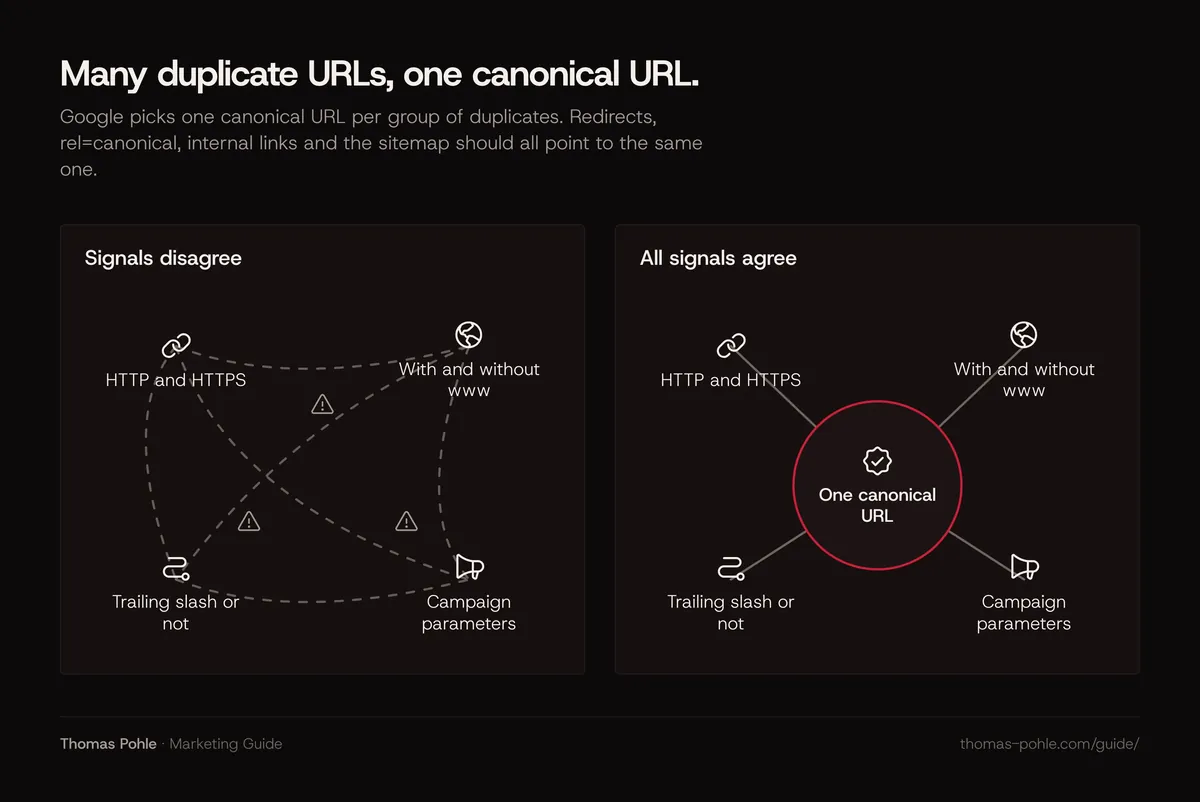
B2B sites produce duplicates, and nobody notices. HTTP and HTTPS, with and without www, trailing slash or not, campaign parameters from LinkedIn ads, the same whitepaper as a landing page and as a PDF. Google picks one canonical URL per group of duplicates. You influence that choice with signals of different strength:
- Redirects are a strong signal. Use them when you retire a duplicate.
rel="canonical"is a strong signal. It works in the HTML head and as an HTTP header. Handy for PDFs.- Sitemap inclusion is a weak signal.
Google advises against using robots.txt or noindex for canonicalization. A noindex removes the page from Search completely instead of consolidating it. Treat canonical tags as strong hints. Google can still choose a different URL if your other signals, such as internal links and sitemap entries, point elsewhere. Make them all agree.
How do you set up hreflang for DACH and other markets?
If you serve Switzerland, Germany and English-speaking markets, hreflang tells Google which page version fits which language and region. Google supports three equivalent methods: link elements in the HTML head, HTTP headers, or the XML sitemap. Pick one. Use it consistently.
- Every version lists itself and all alternates. If page A points to page B but B doesn't point back, Google may ignore the annotations.
- Use fully qualified URLs including the protocol. Alternates may live on different domains.
- Codes are an ISO 639-1 language code, optionally followed by an ISO 3166-1 Alpha 2 region code, for example
de-CH,de-DEoren. A region code on its own is invalid. - Add
x-defaultfor visitors whose language matches none of your versions, usually your language picker or main English page.
Many teams miss this: Google doesn't use hreflang or the HTML lang attribute to detect the language of a page. It reads the content. A German URL with English body copy is an English page to Google. I've run marketing for eight markets, and I'd check return links first. When one version forgets to point back, hreflang fails without any visible error.
Which Core Web Vitals thresholds do you need to hit?
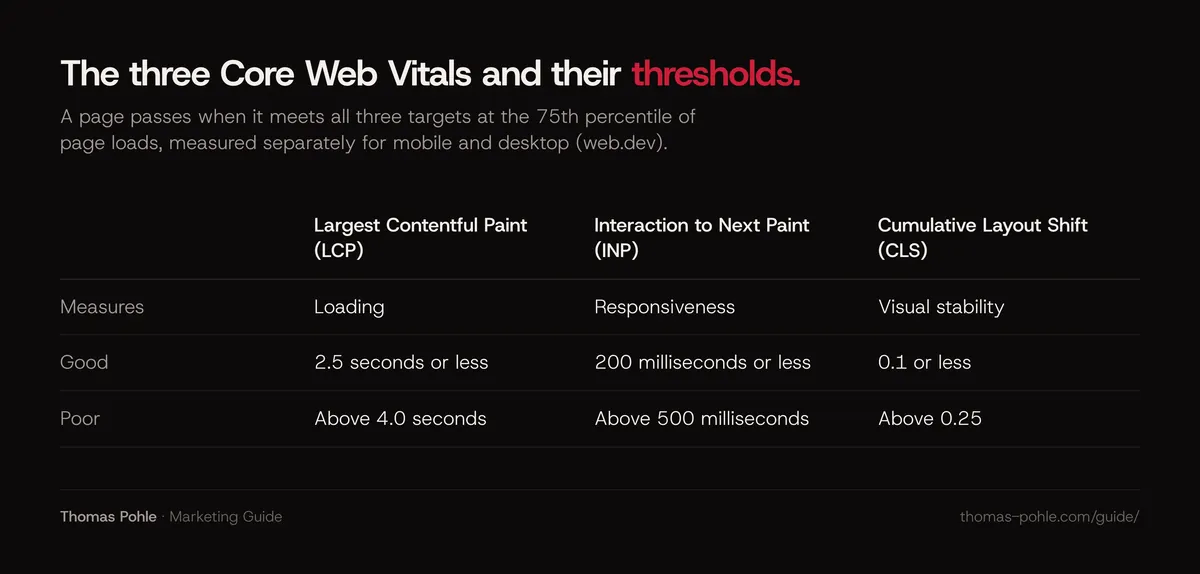
Core Web Vitals measure real user experience. According to web.dev, a page passes when it meets all three targets at the 75th percentile of page loads, measured separately for mobile and desktop.
- Largest Contentful Paint (LCP), loading: good at 2.5 seconds or less, poor above 4.0 seconds.
- Interaction to Next Paint (INP), responsiveness: good at 200 milliseconds or less, poor above 500 milliseconds.
- Cumulative Layout Shift (CLS), visual stability: good at 0.1 or less, poor above 0.25.
INP replaced First Input Delay (FID) as a Core Web Vital in March 2024. Does an agency report or an old plugin still show FID? Then it's out of date.
So how much does this affect ranking? Google says Core Web Vitals are used by its ranking systems. It also says good scores don't guarantee top rankings. Relevant content can still rank with a weaker page experience. My take: Core Web Vitals are a hygiene factor for B2B. Get them green, then spend your time on content.
Search Console's Core Web Vitals report uses field data from the Chrome UX Report and groups similar URLs. Smaller B2B sites often lack enough traffic per URL. Then the report falls back to origin-level data. For page-level debugging, run Lighthouse or PageSpeed Insights and look at the usual suspects: oversized hero images and videos, render-blocking scripts, cookie banners and chat widgets that shift the layout or delay interaction.
Do HTTPS and mobile still matter?
Yes. Google lists secure serving in its page experience self-assessment and offers an HTTPS report in Search Console. For a B2B site, trust and function matter more. Browsers warn on insecure forms, and a demo request form on HTTP is a lead you lose. Check the HTTPS report in Search Console and fix mixed content.
Mobile matters because Google indexes and ranks using the mobile version of a page, crawled with its smartphone agent. With responsive design you're mostly covered. If your mobile pages hide content, drop structured data or use different titles and meta descriptions, Google sees the reduced version. Keep primary content, headings, structured data and metadata equivalent on mobile and desktop. Accordions and tabs are fine for long content. Hiding it isn't.
What should you check in Search Console every month?
Thirty minutes a month in Search Console catches most technical problems on a B2B site before they cost you leads. Put a recurring slot in your calendar and keep it, especially after releases. Then work through the same five reports every time:
- Page indexing: are new or important URLs indexed, any new noindex or soft 404 issues?
- Sitemaps: last read date and errors.
- Core Web Vitals and HTTPS reports: any URL groups that turned poor.
- URL Inspection for every new service page or major update.
- Enhancement reports for your structured data. The details are in which schema markup a B2B website needs.
Want a lightweight reporting setup that also covers Bing and AI referrals? See how to measure organic and AI search visibility.
The technical SEO checklist you can work through this week
| Area | Check | Where to verify |
|---|---|---|
| Crawling | robots.txt blocks nothing you want in search and lists your sitemap | robots.txt file, robots.txt report in Search Console |
| Status codes | Key pages return 200, retired pages return 301 or 404/410, no soft 404s | Page indexing report, a crawler such as Screaming Frog |
| Redirects | One hop from old to new URL, 301 for permanent moves | Crawler, browser network tab |
| Indexing | Every service, product and case study page is indexed | Page indexing report, URL Inspection |
| noindex | No leftover noindex from staging | URL Inspection, page source |
| Sitemap | Only canonical, indexable, absolute URLs, accurate lastmod | Sitemaps report |
| Canonicals | One canonical per page, matching internal links and sitemap | URL Inspection (Google-selected canonical) |
| Duplicates | HTTP, non-www and trailing slash variants redirect to one version | Browser, crawler |
| hreflang | Self-reference, return links, valid codes, x-default | Page source or sitemap, crawler hreflang report |
| Core Web Vitals | LCP up to 2.5 s, INP up to 200 ms, CLS up to 0.1 at the 75th percentile | Core Web Vitals report, PageSpeed Insights |
| HTTPS | All pages and forms on HTTPS, no mixed content | HTTPS report in Search Console |
| Mobile | Same content, headings, structured data and metadata as desktop | URL Inspection (rendered page), Lighthouse |
| Structured data | Valid markup that matches visible content | Rich Results Test, enhancement reports |
| Internal links | No orphan pages, key pages within a few clicks of the homepage | Crawler |
What comes after the technical basics?
Once the checklist is green, technical SEO becomes maintenance. Run it again after every relaunch, CMS migration or new market. The next gains come from structure and content: a clear site architecture with topic clusters and internal links, structured data that describes your company and people, and pages that answer real buyer questions well enough that AI assistants cite them.
Want a second pair of eyes on your setup and a prioritized plan? That's a typical topic for a one-day Momentum Workshop with me.
Frequently asked questions
How often should a B2B company run a technical SEO audit?
Run a full check after every relaunch, CMS migration, domain change or new market launch. That's when redirects, canonicals and noindex settings break. In between, spend 30 minutes a month on the Page indexing, Sitemaps, Core Web Vitals and HTTPS reports in Google Search Console. For a site with a few hundred pages, that's usually enough.
Does robots.txt keep a page out of Google?
No. Google states that robots.txt isn't a mechanism for keeping a web page out of Google. It controls crawling. A blocked URL can still appear in results without a description if other pages link to it. To keep a page out of the index, use a noindex robots meta tag or header, or put the page behind a password.
Is FID still a Core Web Vital?
No. Interaction to Next Paint (INP) replaced First Input Delay (FID) as a Core Web Vital in March 2024. The current three metrics are LCP (good at 2.5 seconds or less), INP (good at 200 milliseconds or less) and CLS (good at 0.1 or less), each assessed at the 75th percentile of page loads on mobile and desktop.
Do I need hreflang if my site has only German and English?
Yes, as long as you have equivalent pages in both languages. hreflang helps Google show the German page to German speakers and the English page to everyone else. If you target Swiss and German audiences with different pages, use region codes such as de-CH and de-DE. Every version must reference itself and all alternates. Add an x-default too.
Does technical SEO affect visibility in AI Overviews?
Yes, indirectly. Google says a page must be indexed and eligible to be shown with a snippet to appear as a supporting link in AI Overviews or AI Mode, and that there are no additional technical requirements. A page that's blocked, noindexed or not indexed can't be used. So the basic crawling and indexing checks apply to AI features too.
Sources
- Google Search Central: Introduction to robots.txt
- Google Search Central: How HTTP status codes and network errors affect Google Search
- Google Search Central: Build and submit a sitemap
- Google Search Central: How to specify a canonical URL
- Google Search Central: Tell Google about localized versions of your page
- web.dev: Web Vitals
- web.dev: Interaction to Next Paint is officially a Core Web Vital
- Google Search Central: Understanding page experience in Google Search results
- Google Search Central: Mobile-first indexing best practices
- Google Search Central: AI features and your website

Thomas PohleB2B marketing advisor in Zurich. More than ten years in B2B marketing at Link11, Beekeeper and smino, most recently as Head of Marketing. CEO and co-founder of TEISENDA. Researched and drafted with AI tools, checked against the sources listed above. More about Thomas