How to measure organic and AI search visibility without heavy tracking

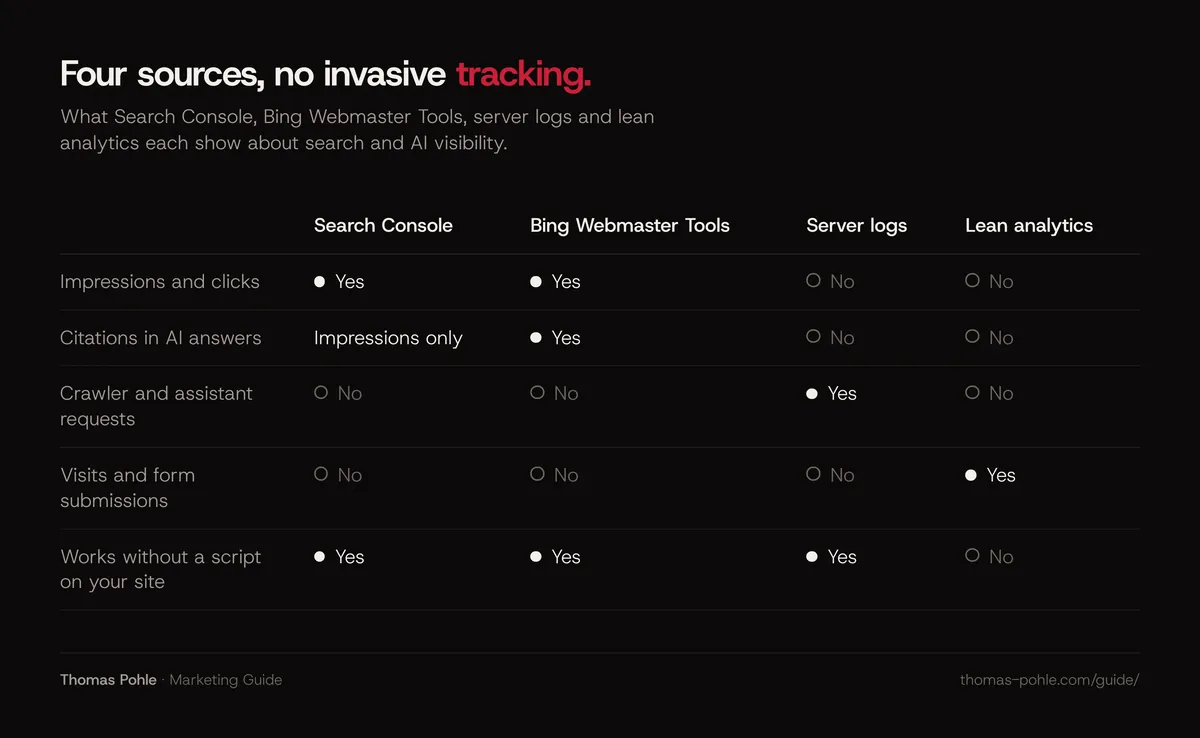
Four sources cover most of your organic and AI search visibility, with no invasive tracking: Google Search Console, Bing Webmaster Tools, your server logs and a lean, privacy-friendly analytics tool. Search Console and Bing show impressions, clicks and, for some AI features, citations. Logs show which crawlers and AI assistants fetch your pages. Analytics shows who actually arrives. The gap is AI answers that mention you without sending a click. Most of that is still invisible.
What should you measure for organic and AI search?
Split visibility into three layers. Each one has different data.
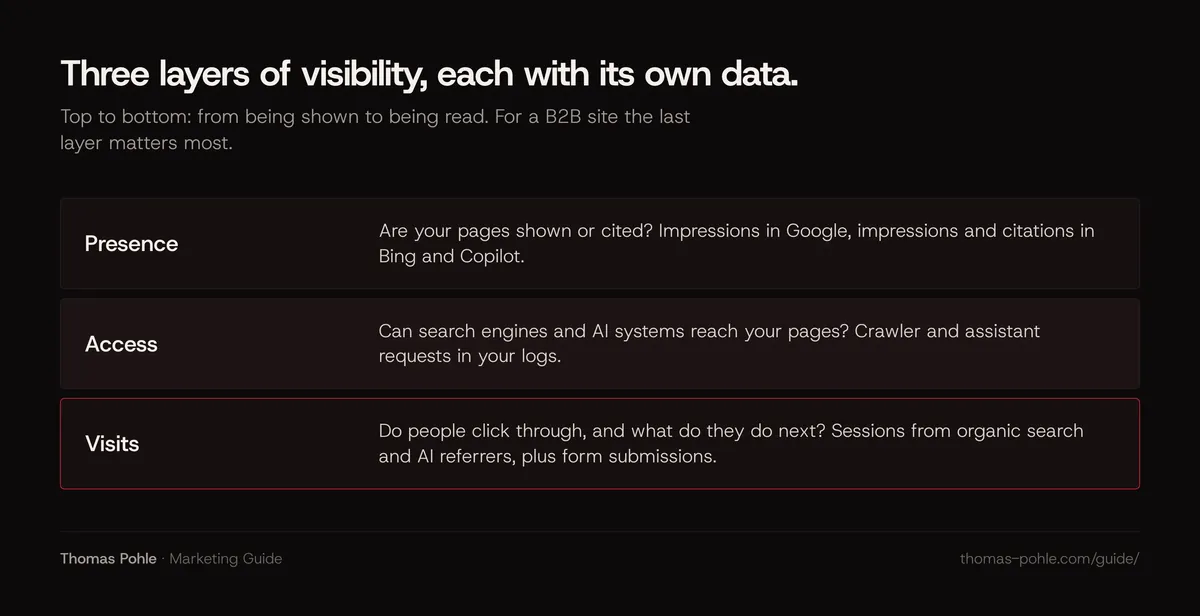
- Presence. Are your pages shown or cited? Impressions in Google, impressions and citations in Bing and Copilot.
- Access. Can search engines and AI systems reach your pages? Crawler and assistant requests in your logs.
- Visits. Do people click through, and what do they do next? Sessions from organic search and AI referrers, plus form submissions.
For a B2B site, the last layer matters most. A buyer who reads your page after asking an AI assistant for a shortlist is worth more than a thousand impressions on a broad keyword.
What does Google Search Console show about AI Overviews and AI Mode?
The Performance report in Search Console shows clicks, impressions, click-through rate and average position for your site, broken down by query, page, country, device and date. Search types include Web, Image, Video and News.
Google states in its documentation on AI features that appearances in AI Overviews and AI Mode count toward your overall search traffic and sit in the Performance report under the Web search type. That report has no separate click number for AI features.
Since 2026 Search Console also has a Generative AI performance report for Search. According to Google's help page:
- It shows impressions, meaning how often links to your site were shown in a generative AI feature on Google Search. It covers AI Overviews and AI Mode and excludes Search Labs experiments.
- You can break it down by page, country, device and date, and filter by text-based and multimodal web search.
- As of 31 August 2026 it's available for all websites worldwide. It only appears once your site has enough impressions in these features.
- Discover has a separate generative AI report with its own counting rules.
A related setting, the Search generative AI control, lets you exclude your site from AI Overviews, AI Mode and generative AI features in Discover. Google says excluding your site means you get no traffic or impressions from these features, that the control isn't used as a ranking signal for other parts of Search, and that it doesn't affect AI training. Exclude your site and the generative AI report shows nothing.
Two practical notes. Export your data regularly, because Search Console keeps only a limited history. And look at pages as well as queries. In B2B, I usually see a handful of pages carry most of the value. Indexing and sitemaps not in place yet? Start with the technical SEO checklist.
What does Bing Webmaster Tools add for Copilot?
Bing matters beyond Bing search. Its Search Performance report counts impressions and clicks from several places, including web results and Chat responses, and lets you filter by source. Bing's help page also notes that data collection starts when you add your site. You can't see anything from before. So set it up now, even if Bing traffic looks small today.
In February 2026 Microsoft launched the AI Performance report as a public preview. According to Bing's documentation, it covers Microsoft Copilot, AI-generated summaries in Bing and select partner AI integrations. It shows:
- Total citations: how often your content was visibly referenced as a source in AI answers.
- Cited pages: which URLs get cited, and the daily average of unique cited pages.
- Grounding queries: the short phrases the AI used when it retrieved your content. Bing says these aren't full user questions or prompts.
In June 2026 Bing added Intents, Topics, Citation Share and a period Compare view, all marked as preview. Read the numbers with Bing's own caveats in mind. The report doesn't measure rankings or importance, and the grounding query data is a sample. Bing calls Citation Share an observational metric. It isn't a ranking system. Bing's documentation doesn't name the partner integrations, so don't read this report as ChatGPT data. For what drives those citations, see how to get your company cited by ChatGPT, Perplexity and Google AI Overviews.
How do you track visits from ChatGPT, Perplexity and other AI assistants?
Visits from AI assistants show up in analytics through the referrer, through a UTM parameter or not at all. What each provider documents differs.
| Source | What you usually see | Documented by the provider? |
|---|---|---|
| Google AI Overviews and AI Mode | Organic search traffic from Google | Yes. Google Analytics counts them as Organic Search, and Search Console reports them under Web |
| ChatGPT | Referrer chatgpt.com and often a utm_source=chatgpt.com parameter | OpenAI has described the UTM parameter in its publisher FAQ. Check your own data |
| Perplexity | Referrer perplexity.ai when one is passed | No. Perplexity's crawler documentation does not cover referrers |
| Copilot, Gemini and others | Varies by app and browser | Partly. Google Analytics groups many of them in its AI Assistant channel |
If you use Google Analytics, its default channel group now has an AI Assistant channel for visits from sources like ChatGPT and Gemini, based on a list of known AI referrers. Google's documentation states that this channel excludes AI Overviews and AI Mode, which stay in Organic Search. Google also says the descriptions may change as the market changes.
Whatever tool you use, expect undercounting. When an assistant app opens a link without passing a referrer, the visit looks like direct traffic. Watch for spikes in direct visits to a deep article page. Nobody types those URLs by hand, so they're often worth a closer look.
What can server logs tell you about AI crawlers?
Logs show requests that analytics scripts never see, because crawlers don't run JavaScript. Look for these user agents:
- Googlebot for Google Search.
- OAI-SearchBot for ChatGPT search. OpenAI says sites that block it won't be shown in ChatGPT search answers.
- GPTBot, which OpenAI uses for model training. You can block it separately from OAI-SearchBot.
- ChatGPT-User, which visits pages when a user's question in ChatGPT triggers it. OpenAI says it isn't used for automatic crawling.
- PerplexityBot for Perplexity's search results and Perplexity-User for fetches triggered by a user's question.
Requests from ChatGPT-User or Perplexity-User are the closest thing to an AI visibility signal you can own. They mean an assistant fetched your page while answering someone, even if that person never clicked. Count them per page per month. Anyone can fake a user agent, so check OpenAI requests against the IP ranges OpenAI publishes before you trust the numbers.
Which privacy-friendly setup is enough for a B2B site?
You don't need user-level tracking to answer the questions that matter. Here's my lean setup:
- A cookieless or aggregate analytics tool that reports page views, referrers, UTM parameters and conversions, without building profiles of individual visitors.
- Consistent UTM parameters on every link you control, such as newsletters and LinkedIn posts. The rest of your traffic gets easier to read.
- A free text field on your contact or demo form that asks how people found you. If a buyer names an AI assistant there, you learn something no tool would attribute.
- Search Console and Bing Webmaster Tools, which work without any tracking on your site.
Keep the data protection side in mind for your analytics and form data. For the basics in a marketing context, see where to start with AI in B2B marketing.
What can you not measure yet?
Be honest in your reporting about the blind spots.
- Mentions without clicks. When ChatGPT, Perplexity or the Gemini app name your company and nobody clicks, you usually see nothing. I don't know of a public publisher dashboard from OpenAI or Perplexity comparable to Search Console.
- Clicks from Google's AI features. Search Console shows AI impressions separately. Clicks are mixed into Web.
- The actual prompts. Bing's grounding queries are short phrases. They aren't the questions people typed. Google's generative AI report shows no queries at all.
- Stable rankings in AI answers. Answers change between runs, users and days. Manual checks, where you ask an assistant the questions your buyers ask, are useful snapshots. Treat them as a sample.
That's why I measure trends over months. One month tells you little. Six months of the same numbers, collected the same way, tell you whether your answer engine optimization work is paying off.
How do you set up a monthly visibility report this week?
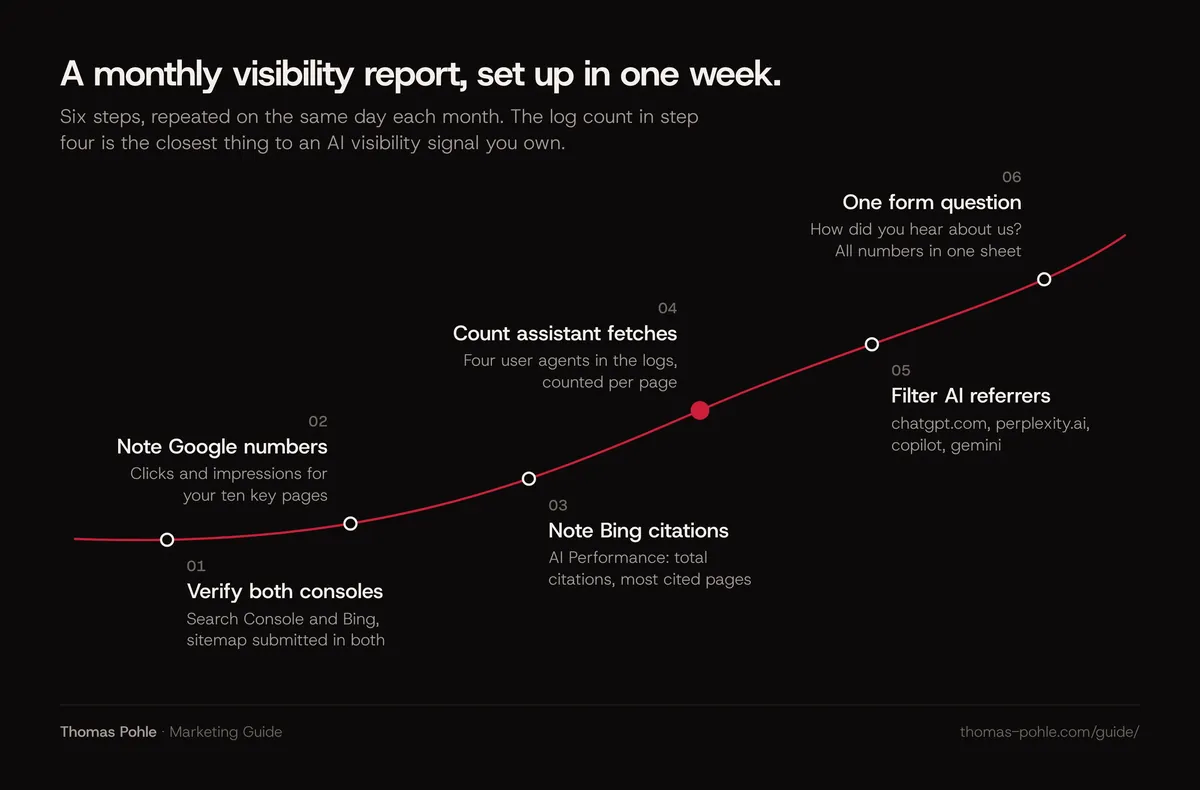
- Verify your site in Google Search Console and Bing Webmaster Tools. Submit your sitemap in both.
- In Search Console, note clicks and impressions for your ten most important pages, and check whether the Generative AI performance report is available for your site.
- In Bing Webmaster Tools, open AI Performance and note total citations and your most cited pages.
- Ask your hosting provider or developer for access to raw server logs. Count monthly requests from OAI-SearchBot, ChatGPT-User, PerplexityBot and Perplexity-User per page.
- In your analytics, create a view for referrers containing chatgpt.com, perplexity.ai, copilot and gemini. Or use the AI Assistant channel if you're on Google Analytics.
- Add a "How did you hear about us?" field to your main form.
- Put all numbers into one simple sheet. Repeat on the same day each month.
Rather set this up with someone who has done it before? A one-day Momentum Workshop with Thomas covers measurement as part of the plan.
Frequently asked questions
Does Google Search Console show traffic from AI Overviews?
Partly. Google includes AI Overviews and AI Mode in the Performance report under the Web search type. Their clicks and impressions are part of your totals, without a split. The separate Generative AI performance report, available for all websites since 31 August 2026, shows impressions in these features by page, country, device and date. It has no clicks or queries.
Does Bing Webmaster Tools show ChatGPT citations?
Bing documents its AI Performance report as covering Microsoft Copilot, AI-generated summaries in Bing and select partner AI integrations. It doesn't name ChatGPT or other partners. Treat the report as data about Microsoft's AI experiences. Track ChatGPT through referrers, the utm_source parameter and ChatGPT-User requests in your server logs.
Why does AI traffic show up as direct traffic?
When an app or browser opens a link without passing a referrer, analytics tools can't tell where the visit came from. They record it as direct. Some AI assistant apps do exactly that. ChatGPT often adds a UTM parameter, which helps. For the rest, watch for unusual direct visits to deep pages and ask new leads how they found you.
Should I block AI crawlers to protect my content?
Decide per crawler. OpenAI separates OAI-SearchBot, which decides whether you can appear in ChatGPT search answers, from GPTBot, which is used for model training. Perplexity separates PerplexityBot from user-triggered fetches. My rule of thumb: a B2B company that wants AI assistants to recommend it should allow the search crawlers, even if it blocks training crawlers.
Do I need cookies to measure organic visibility?
No. Search Console and Bing Webmaster Tools work without any tracking on your site. Your web server collects logs anyway. And cookieless analytics tools can report referrers, UTM parameters and conversions. User-level tracking adds little for the questions most B2B teams ask about search and AI visibility.
Sources
- Search Console Help: Performance report (Search results)
- Search Console Help: Generative AI performance report (Search)
- Search Console Help: Search generative AI control
- Google Search Central: AI features and your website
- Bing Webmaster Tools Help: AI Performance
- Bing Blogs: New AI Visibility Insights in Bing Webmaster Tools (Intents, Topics, Citation Share, Compare)
- Bing Webmaster Tools Help: Search Performance
- Google Analytics Help: Default channel group
- OpenAI: Overview of OpenAI Crawlers
- Perplexity: Perplexity Crawlers

Thomas PohleB2B marketing advisor in Zurich. More than ten years in B2B marketing at Link11, Beekeeper and smino, most recently as Head of Marketing. CEO and co-founder of TEISENDA. Researched and drafted with AI tools, checked against the sources listed above. More about Thomas