Which schema markup does a B2B website need?

Your B2B website needs five schema.org types, written in JSON-LD. Organization on the homepage or about page, Person for founders and authors, Article or BlogPosting on every content page, BreadcrumbList to show your site structure, and Service for what you sell. LocalBusiness only makes sense if clients visit a physical office. Product and SoftwareApplication fit only when you show prices or genuine reviews. FAQPage no longer produces rich results in Google. Don't bother adding it.
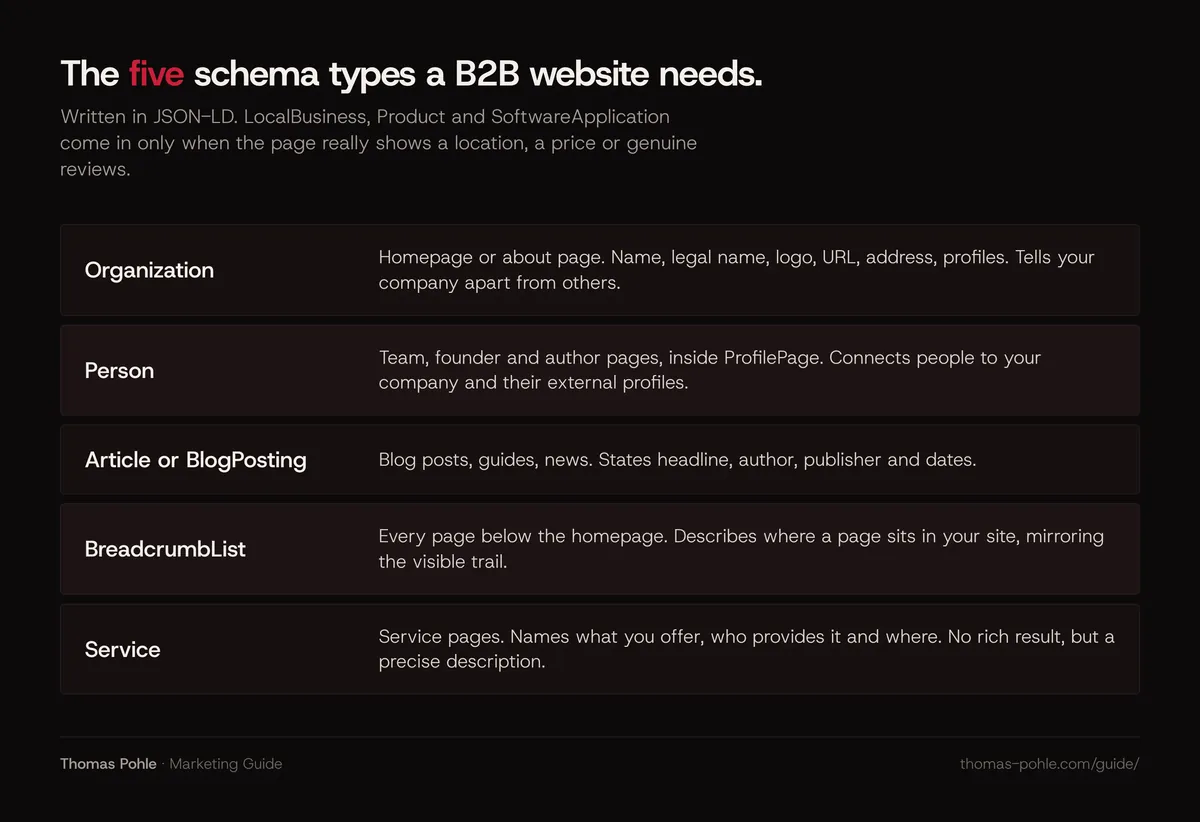
Here's what each type does, where it goes, what Google changed recently, and a complete JSON-LD example to adapt.
What does schema markup actually do for a B2B website?
Structured data is a standardized description of what a page is about. For companies, Google says Organization markup helps it understand your administrative details and tell your organization apart from others. Some types also make a page eligible for rich results, the enhanced listings with images, breadcrumbs or ratings.
Three rules from Google's general guidelines shape everything else:
- JSON-LD is the recommended format. Microdata and RDFa still work. JSON-LD is easier to maintain. It sits in one script block instead of being woven into your HTML.
- Mark up only what users can see. Your structured data must be a true representation of the visible page content.
- Nothing is guaranteed. Valid markup makes a page eligible for rich results. Google doesn't promise to show them. Markup that violates the guidelines can lead to a manual action that removes rich result eligibility, although Google says such an action doesn't affect how the page ranks in web search.
For AI search, Google's documentation on AI features says there's no special schema.org markup you need to add to appear in AI Overviews or AI Mode, and that your structured data should match the visible text. So schema is no shortcut into AI answers. What it gives you is a clean, machine-readable statement of who you're. That supports the entity work described in connecting your website, LinkedIn and profiles into one brand.
Which schema types should a B2B website use, and where?
| Type | Where it goes | Why it matters for B2B |
|---|---|---|
| Organization | Homepage or about page | Defines your company: name, legal name, logo, URL, address, profiles. Google uses it to tell your organization apart from others. |
| Person (inside ProfilePage) | Team, founder and author pages | Connects people to your company and to their external profiles. |
| Article or BlogPosting | Blog posts, guides, news | States headline, author, publisher and dates. |
| BreadcrumbList | Every page below the homepage | Describes where a page sits in your site and can show as a breadcrumb trail in results. |
| Service | Service pages | Names what you offer, who provides it and where. |
| LocalBusiness subtype | Only for real locations clients visit | Address, opening hours, geo coordinates. |
| Product or SoftwareApplication | Only pages with prices or genuine third-party reviews | Can enable product or app rich results if the required properties exist. |
How do you mark up your company with Organization?
Google recommends placing Organization markup on your homepage or on one page that describes your company, such as the about page. You don't need it on every page. There are no required properties. Google asks you to add every one that applies.
For a B2B company, these are the useful ones:
name,legalNameandalternateNameif people know you under a short form.urlandlogo. The logo should be at least 112 by 112 pixels, crawlable, and look right on a white background.sameAswith your LinkedIn company page and other official profiles.addressandcontactPoint, with phone numbers in international format.vatID, which Google calls an important trust signal because users can check it in public registries.founder,foundingDate,numberOfEmployeesanddescriptionwhere you're comfortable publishing them.
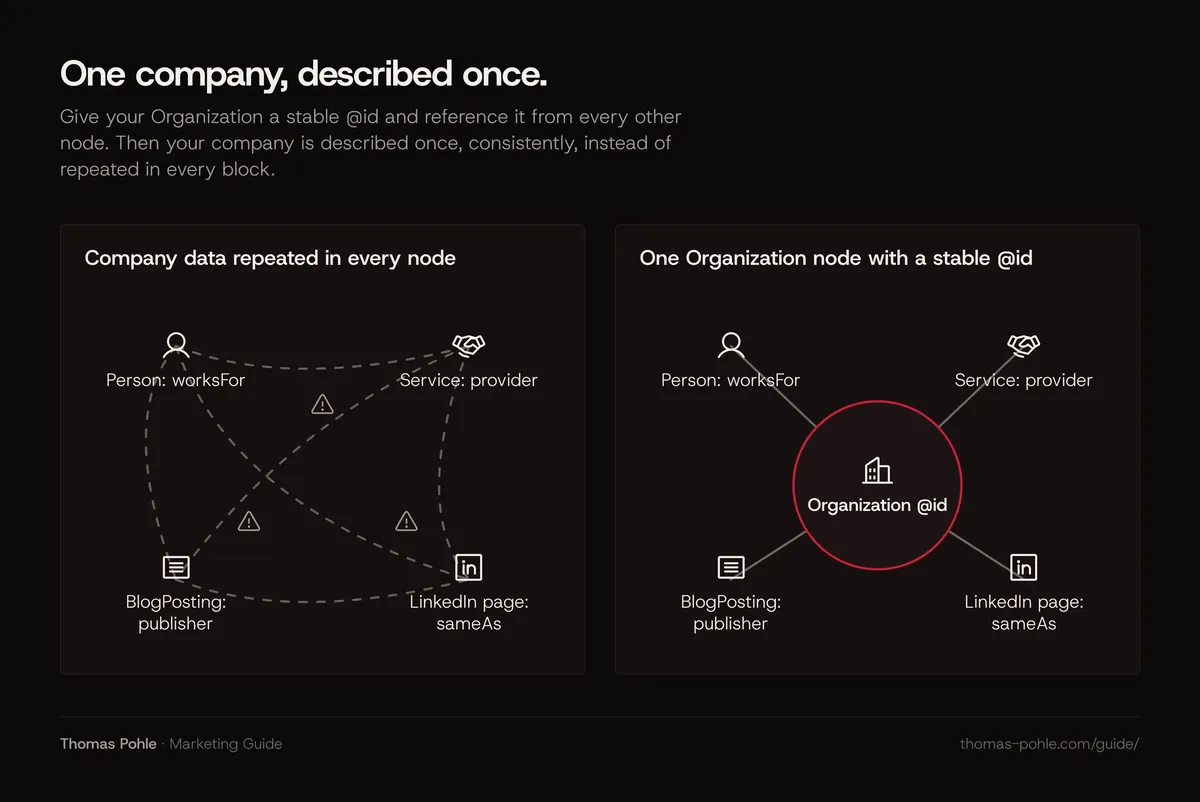
My rule of thumb, and the single most useful habit: give your Organization a stable @id, for example https://www.example.com/#organization, and reference it from every other node. Your company is then described once, consistently.
How should you mark up founders and authors?
B2B buying runs on trust. So the people behind the company matter. Use a Person node with name, jobTitle, worksFor pointing to your Organization, url of their team or author page, and sameAs links to LinkedIn and other profiles.
On the team or author page itself, Google supports ProfilePage markup with the Person as mainEntity. Google lists company employee pages and blog About Me pages among the valid uses. This pairs well with visible bylines and author bios, which I cover in how to show expertise to Google and AI.
Google's author guidance for articles is specific. Include every author shown on the page. Put only the name in author.name, never the job title or company. Use Person for people and Organization for companies, and add a url or sameAs that identifies the author.
Do you need LocalBusiness or ProfessionalService?
Many B2B templates default to ProfessionalService. Don't copy that blindly. Check schema.org first. Schema.org states that the general ProfessionalService type was deprecated due to confusion with Service. It still exists as a LocalBusiness subtype. I wouldn't build on it.
Use a LocalBusiness subtype only when you have a physical location that clients visit. On schema.org, LocalBusiness sits under both Organization and Place, so it describes a place of business. Pick the most specific subtype, for example AccountingService or LegalService. Do you meet clients online, as a consultancy or software company? Then you're better described as an Organization with an address, plus Service nodes for its offers.
How do you mark up articles and breadcrumbs?
Article. Google supports Article, NewsArticle and BlogPosting. None of the properties are required. The recommended ones are headline, image, author, datePublished and dateModified. Use ISO 8601 dates with a timezone. Only change dateModified when the content really changed.
BreadcrumbList. It holds an itemListElement list of ListItem entries, each with a position, a name and an item URL, starting at position 1. Mirror the breadcrumb trail visitors see on the page. It states your hierarchy in a form machines can read. That helps when your site is organized in topic clusters.
Should you still use FAQPage markup?
Not for Google rich results. Google retired the FAQ rich result in May 2026, and old markup does no harm. Don't add new FAQPage markup for SEO. The history still matters here, because many SEO tools keep recommending it to B2B sites.
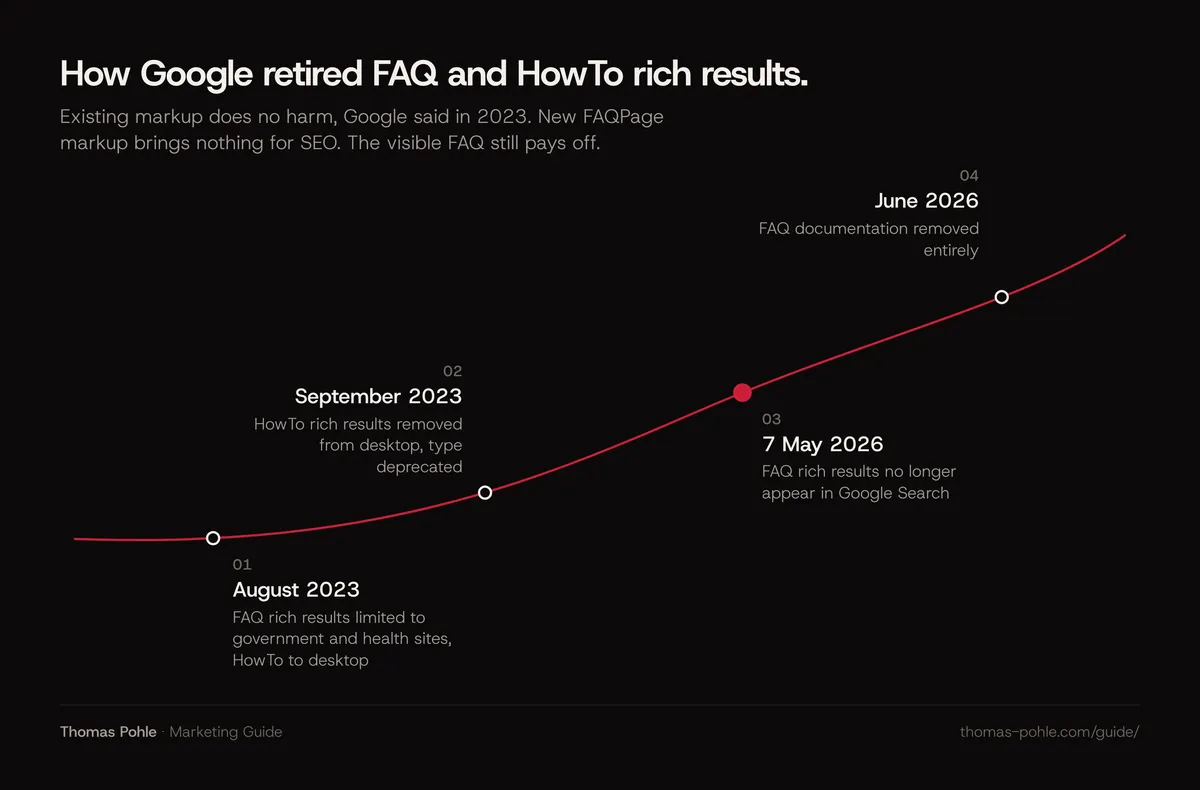
- August 2023. Google limited FAQ rich results to well-known, authoritative government and health websites. In the same announcement it restricted HowTo rich results to desktop.
- September 2023. Google removed HowTo rich results from desktop too and deprecated the type.
- May 2026. Google deprecated the FAQ rich result feature, stating it no longer appears in Search from 7 May 2026. In June 2026 Google removed the FAQ documentation entirely.
Google said in 2023 that structured data that isn't being used doesn't cause problems for Search. So existing FAQPage or HowTo markup does no harm. I wouldn't add new FAQPage markup for SEO reasons. Do other search engines or AI assistants read FAQPage markup? They don't document it in a way I could verify, so I wouldn't count on it. What still pays off is the visible FAQ itself. Short, direct answers to real buyer questions are exactly what readers and answer engines can use.
What about Product, SoftwareApplication and Service?
For software, Google's app rich result requires a name, offers.price and either aggregateRating or review. No public price and no genuine reviews on your SaaS? Then the markup won't produce a rich result. The same logic applies to Product: use it on pages that describe one concrete product with real offer or review data.
Be careful with ratings on your own site. Google's review snippet guidelines say that when the reviewed entity controls the reviews about itself, its pages using LocalBusiness or Organization markup aren't eligible for star ratings. That includes reviews embedded from a third-party widget.
My take: Service is the honest type for most B2B offers. Schema.org defines it as a service provided by an organization, with properties such as provider, serviceType, areaServed and offers. Google's search gallery lists no rich result for it. Its value is a precise description of your offer.
What does a complete JSON-LD example look like?
Here's the markup for a blog post on the site of a fictional Zurich software company. It connects the company, the author, one service and the breadcrumb trail through @id references. The Organization node stays compact. Your full Organization markup belongs on the homepage.
<script type="application/ld+json">
{
  "@context": "https://schema.org",
  "@graph": [
    {
      "@type": "Organization",
      "@id": "https://www.example.com/#organization",
      "name": "Example Industrial Software AG",
      "url": "https://www.example.com/",
      "logo": "https://www.example.com/images/logo.png",
      "address": {
        "@type": "PostalAddress",
        "addressLocality": "Zurich",
        "addressCountry": "CH"
      },
      "sameAs": ["https://www.linkedin.com/company/example-industrial-software"]
    },
    {
      "@type": "Person",
      "@id": "https://www.example.com/team/anna-muster/#person",
      "name": "Anna Muster",
      "jobTitle": "Head of Product",
      "url": "https://www.example.com/team/anna-muster/",
      "worksFor": { "@id": "https://www.example.com/#organization" },
      "sameAs": ["https://www.linkedin.com/in/anna-muster-example"]
    },
    {
      "@type": "Service",
      "@id": "https://www.example.com/services/predictive-maintenance/#service",
      "name": "Predictive maintenance software rollout",
      "serviceType": "Industrial software implementation",
      "provider": { "@id": "https://www.example.com/#organization" },
      "areaServed": ["Switzerland", "Germany", "Austria"],
      "url": "https://www.example.com/services/predictive-maintenance/"
    },
    {
      "@type": "BlogPosting",
      "@id": "https://www.example.com/blog/predictive-maintenance-costs/#article",
      "headline": "What does predictive maintenance cost a mid-sized plant?",
      "image": "https://www.example.com/images/predictive-maintenance-16x9.jpg",
      "datePublished": "2026-10-20T09:00:00+02:00",
      "dateModified": "2026-10-22T14:30:00+02:00",
      "author": { "@id": "https://www.example.com/team/anna-muster/#person" },
      "publisher": { "@id": "https://www.example.com/#organization" },
      "about": { "@id": "https://www.example.com/services/predictive-maintenance/#service" },
      "mainEntityOfPage": "https://www.example.com/blog/predictive-maintenance-costs/"
    },
    {
      "@type": "BreadcrumbList",
      "itemListElement": [
        { "@type": "ListItem", "position": 1, "name": "Blog", "item": "https://www.example.com/blog/" },
        { "@type": "ListItem", "position": 2, "name": "Predictive maintenance costs", "item": "https://www.example.com/blog/predictive-maintenance-costs/" }
      ]
    }
  ]
}
</script>
Every value in this block must also be visible on the page. The author name and role in the byline, the dates, the breadcrumb trail, the company name in the footer.
How do you roll out schema markup this week?
- List your page templates: homepage, about, team member, service, blog post, case study. Most B2B sites have fewer than ten.
- Decide one type per template using the table above. Skip types that would describe content the page doesn't show.
- Write the Organization block once, with a stable
@id, and check every fact against your imprint and commercial register entry. - Add Person and ProfilePage markup to team and author pages, with the same
sameAslinks you use elsewhere. - Add BlogPosting and BreadcrumbList to the blog template, filled automatically from the CMS fields.
- Remove any
ProfessionalServiceor self-serving review markup a theme or plugin added. - Test one page per template in Google's Rich Results Test, then confirm with URL Inspection in Search Console that Google sees the markup.
- After a few days, check the enhancement reports in Search Console for errors.
Where does schema markup fit into your wider SEO work?
Schema only works on top of a site Google can already crawl and index. Pages blocked, noindexed or slow? Fix that first, with the technical SEO checklist for B2B websites. Want your company described consistently across your site, LinkedIn and AI answers? Your next step is answer engine optimization. If you'd rather set up the templates together and leave with a working plan, book a one-day Momentum Workshop.
Frequently asked questions
Does schema markup improve rankings?
No. Google doesn't describe structured data as a ranking factor. It says structured data helps it understand page content and can make pages eligible for rich results, which it never guarantees. Google also notes that a manual action for structured data issues removes rich result eligibility but doesn't affect how the page ranks in web search. Its value is describing your company and content clearly.
Do I need special schema markup for AI Overviews or ChatGPT?
For Google, no. Its documentation on AI features says there's no special schema.org structured data you need to add for AI Overviews or AI Mode, and that structured data should match the visible text. Other AI providers don't document a schema requirement that I could verify. Accurate Organization and Person markup still helps. It describes your company consistently.
Should I remove old FAQPage or HowTo markup?
You don't have to. Google said in 2023 that structured data that isn't being used doesn't cause problems for Search. HowTo rich results were deprecated in September 2023, and FAQ rich results stopped appearing in Google Search on 7 May 2026. Removing it's optional cleanup. Keep the visible FAQ if it helps readers.
Can I use ProfessionalService for a consulting firm?
Schema.org states that the general ProfessionalService type was deprecated due to confusion with Service. It still validates as a LocalBusiness subtype. It signals a physical location, though. If your consultancy works mostly online, describe it as an Organization with Service nodes. If clients visit your office, use the most specific LocalBusiness subtype available, such as AccountingService or LegalService.
How do I test schema markup?
Use Google's Rich Results Test while you build. It shows which rich results a page is eligible for and flags errors. After launch, run URL Inspection in Search Console to confirm Google sees the markup on the live page, and watch the enhancement reports for new errors. Re-crawling can take several days. Don't expect changes immediately.
Sources
- Google Search Central: AI features and your website
- Google Search Central: General structured data guidelines
- Google Search Central: Organization structured data
- Google Search Central: Article structured data
- Google Search Central: Profile page structured data
- Google Search Central Blog: Changes to HowTo and FAQ rich results (August 2023)
- Google Search Central: Latest documentation updates (FAQ rich result deprecation, May and June 2026)
- Google Search Central: Review snippet structured data
- schema.org: ProfessionalService
- Google Search Central: Software app structured data

Thomas PohleB2B marketing advisor in Zurich. More than ten years in B2B marketing at Link11, Beekeeper and smino, most recently as Head of Marketing. CEO and co-founder of TEISENDA. Researched and drafted with AI tools, checked against the sources listed above. More about Thomas