How do you connect your website and profiles into one brand?

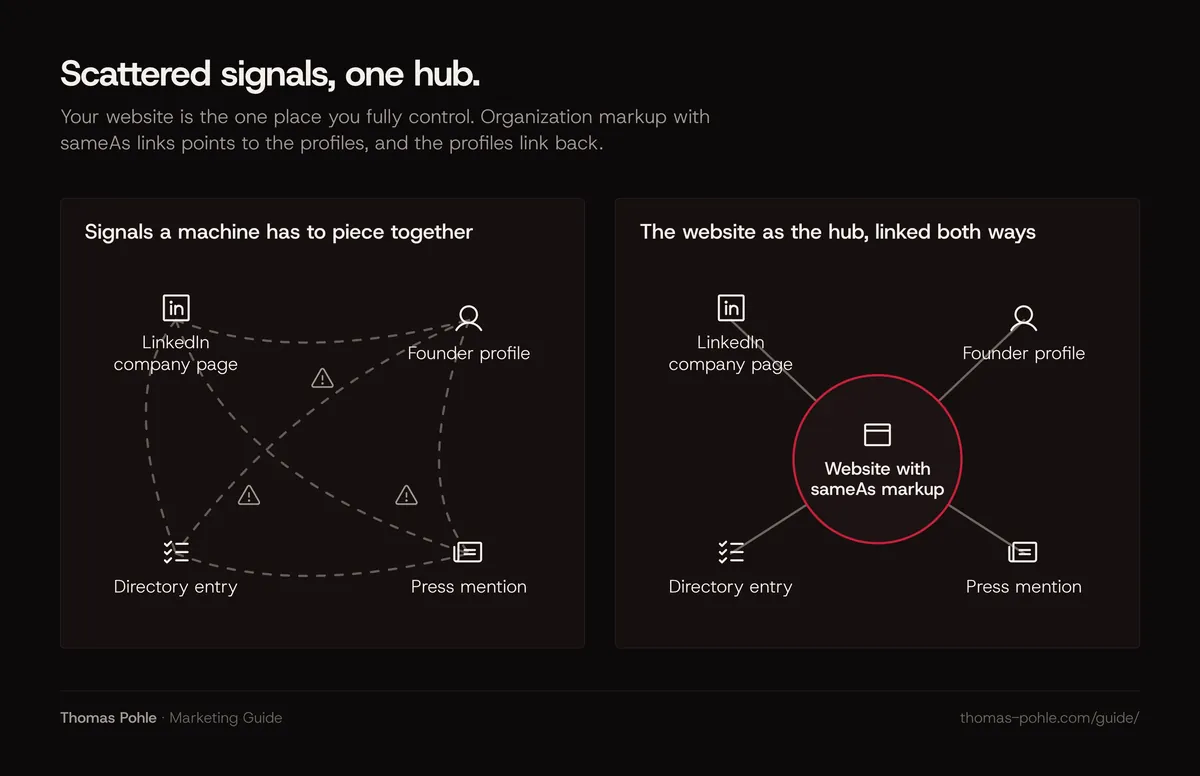
Search engines and AI assistants piece your brand together from scattered signals: a website, a LinkedIn company page, a founder profile, a directory entry, a press mention. Your job is to make those signals agree and point them at each other. Then a machine can conclude with confidence that they all describe the same company. In practice: one exact name, one set of facts, structured data with sameAs links on your website, and profiles that link back.
Why does entity consistency matter for Google and AI search?
Google describes its knowledge panels as automatically generated from many sources on the web, and they update as that information changes. Google also picks the site name it shows in results from your home page and from references to your site elsewhere on the web. AI assistants that search the web work from the same raw material. If your website says Pohle Advisory, LinkedIn says Pohle Consulting and a directory lists an old address, the machine has to guess which one is right. Or whether they're three different companies.
For B2B companies this matters more than it looks. Buyers research suppliers before they talk to sales, and more of that research now starts with a question to an AI assistant. When the answer mixes you up with someone else, or describes what you did three years ago, you rarely find out. The overview of answer engine optimization explains how those answers pick their sources. Clean entity data is the foundation under all of it.
What should be identical everywhere?
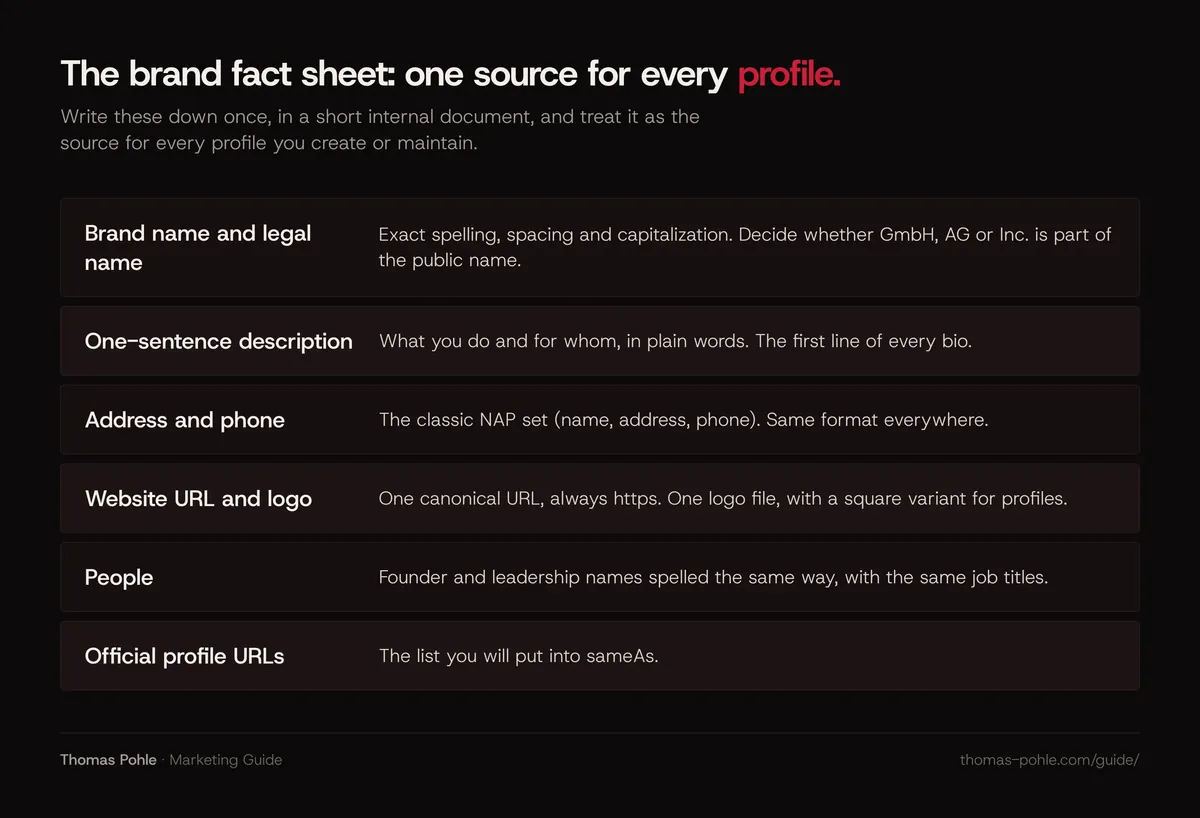
Write these down once, in a short internal document. Treat it as the source for every profile:
- Brand name. The exact spelling, spacing and capitalization. Decide whether the legal suffix (GmbH, AG, Inc.) is part of the public name.
- Legal name. As registered, for the imprint, structured data and registries.
- One-sentence description. What you do and for whom, in plain words. Reuse it as the first line of every bio.
- Address and phone. The classic NAP set (name, address, phone). Same format everywhere.
- Website URL. One canonical version, with or without www, always https.
- Logo. One file, one version, square variant for profiles.
- People. Founder and leadership names spelled the same way, with the same job titles.
- Official profile URLs. The list that goes into
sameAs.
Google's own guidance on site names puts it plainly: use your site name consistently across your home page. The same logic applies across the web.
How do you mark up your website with Organization and sameAs?
Your website is the one place you fully control. Make it the hub. Schema.org defines sameAs as the URL of a reference web page that unambiguously indicates the item's identity. Google's documentation on Organization structured data lists it as a recommended property and describes it as a page on another website with additional information about your organization. You can list several.
Google's documentation also says:
- Put Organization markup on the home page or on one page that describes the organization, such as the about page. It doesn't need to be on every page.
- There are no required properties. Recommended ones include
name,alternateName,legalName,url,logo,sameAs,address,contactPoint,foundingDate,vatIDandiso6523Codefor identifiers such as DUNS, GLN or LEI. - The logo should be at least 112 by 112 pixels, crawlable and look right on a white background.
- Use the most specific type that fits, for example a LocalBusiness subtype if you have a physical location.
- Markup doesn't guarantee that any feature appears in search results.
Founder-led company? Describe the founder as a Person too, and connect the two. JSON-LD lets you give each node an @id and reference it elsewhere. So the company can name its founder and the person can name the company without repeating everything. A compact pattern:
{
  "@context": "https://schema.org",
  "@graph": [
    {
      "@type": "ProfessionalService",
      "@id": "https://example.com/#org",
      "name": "Example Advisory",
      "legalName": "Example Advisory GmbH",
      "url": "https://example.com/",
      "logo": "https://example.com/logo.png",
      "address": {"@type": "PostalAddress", "addressLocality": "Zurich", "addressCountry": "CH"},
      "founder": {"@id": "https://example.com/#founder"},
      "sameAs": [
        "https://www.linkedin.com/company/example-advisory",
        "https://www.wikidata.org/wiki/Q00000000"
      ]
    },
    {
      "@type": "Person",
      "@id": "https://example.com/#founder",
      "name": "Jane Example",
      "jobTitle": "Founder",
      "worksFor": {"@id": "https://example.com/#org"},
      "sameAs": ["https://www.linkedin.com/in/jane-example"]
    }
  ]
}
Only list profiles you own or that are clearly about you. A sameAs pointing to a random directory page weakens the signal. If you have a dedicated page about a person, such as an author or team page, Google supports ProfilePage markup with the person as mainEntity, and that also accepts sameAs. The article on which schema markup a B2B website needs covers the other types.
How should LinkedIn and other profiles link back?
Structured data is one direction. The profiles have to point back, so the connection is confirmed from both sides. My checklist for a B2B company:
- LinkedIn company page. Same name as the website, same one-line description, the canonical website URL, same logo, correct location and industry.
- LinkedIn personal profiles. Founders and leadership list the current role linked to the company page, so the company logo appears in the experience section. And they add the website in the contact info.
- Other official profiles. YouTube, X, GitHub, industry associations, partner directories. Same name, same description, link to the website.
- Imprint and registries. The legal name and address on your imprint should match the commercial register and your structured data.
- Press and partner pages. When someone writes about you, send them the exact name, the one-liner and the URL. Correct old mentions where you can.
Don't chase mentions. Google is clear on that. Its guide to generative AI features says that seeking inauthentic mentions across the web isn't as helpful as it might seem. Aim for accurate profiles and real coverage. The guide on getting cited by ChatGPT, Perplexity and AI Overviews goes deeper on third-party mentions.
When do you need a Google Business Profile?
Only if you qualify. Google allows a Business Profile for businesses with a physical location customers can visit, or businesses that travel to customers. A rented mailing address where you don't operate isn't eligible. If you serve customers at their site, set up a service-area business and hide your address.
The profile name must reflect your real-world business name. Taglines, service descriptions or locations in the name aren't permitted. Google says local results depend mainly on relevance, distance and prominence, and that businesses with complete and accurate information are more likely to show up. Its generative AI guide adds that Business Profiles can help your products and services appear in AI responses.
Many B2B companies aren't a fit, especially software and consulting firms that work remotely. Don't invent a storefront to get one.
Should you create a Wikidata entry?
Careful here. Wikidata is a structured knowledge base that many systems read, so an entry can be a strong sameAs target. It also has a notability policy. An item is acceptable only if it meets at least one of three criteria: it has a valid sitelink to a Wikipedia or other Wikimedia page, it describes a clearly identifiable entity that can be documented with serious and publicly available references, or it fulfills a structural need for other items.
Wikidata's page for article subjects says you shouldn't create an item about yourself unless you're sure it meets those criteria, and statements must be sourced to reliable, verifiable references. My rule of thumb: add a company to Wikidata only when independent coverage exists, for example trade press, a commercial register entry and published articles. If an item already exists, you may correct it with sources. Never create a Wikipedia article about yourself. Wikidata explicitly asks people not to.
How do knowledge panels work and can you claim one?
You can't order a knowledge panel. Google generates them automatically once it has enough confidence about an entity. If one exists for you or your company, claim it: click Claim this knowledge panel and verify through one of the official sites or profiles Google offers. After that you can suggest changes. Anyone else can send feedback through the link on the panel.
No panel yet? Then the work above is what you can do. Consistent facts, clean markup and real references give Google the material it needs. There's no shortcut and no guaranteed timeline.
What is a practical checklist for this week?
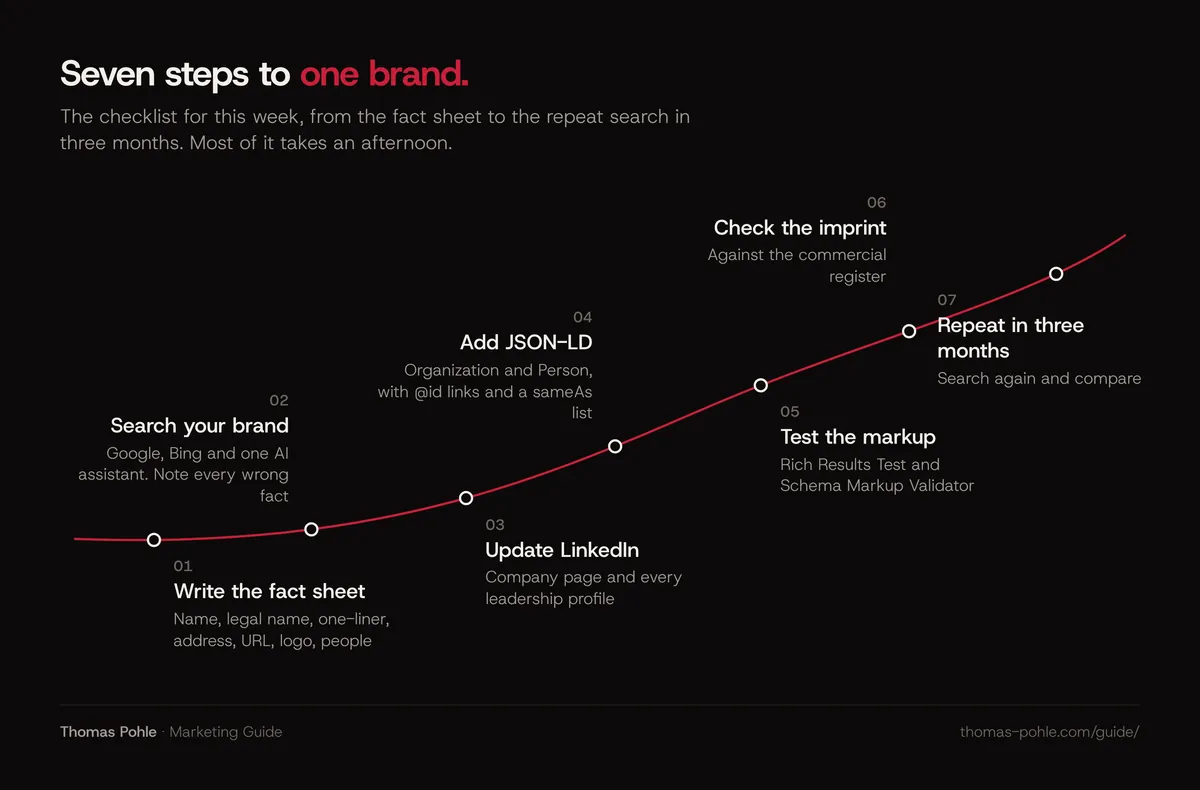
- Write the one-page brand fact sheet: brand name, legal name, one-liner, address, phone, canonical URL, logo, people and titles.
- Search your brand name and founder name on Google, Bing and one AI assistant. Note every wrong or outdated fact.
- Update the LinkedIn company page and every leadership profile to match the fact sheet.
- Add or fix Organization and Person JSON-LD on the home page or about page, with
@idlinks and asameAslist of your official profiles. - Test the markup with Google's Rich Results Test and the Schema Markup Validator.
- Check your imprint against the commercial register.
- If you qualify, claim or update your Google Business Profile. If you have a knowledge panel, claim it.
- Make sure your llms.txt and author pages say the same as everything else. The article on showing expertise with E-E-A-T covers author pages and bylines.
- Repeat the brand search in three months and compare.
What goes wrong most often?
- Rebrands without cleanup. The new name goes on the website. The old name lives on in LinkedIn, directories and the logo file in your markup.
- Brand and legal name mixed at random. Pick which one is public and use
legalNamefor the other. - Personal and company entities blurred. For founder-led firms, a clear Person and a clear Organization, linked with
founderandworksFor, beats one muddled profile. - Markup that disagrees with the page. If the JSON-LD says one founding year and the about page says another, the machine is back to guessing.
This is unglamorous work, and most of it takes an afternoon. Want help deciding the name, the one-liner and the positioning behind them first? That's a good use of a one-day Momentum Workshop.
Frequently asked questions
What is sameAs in schema markup?
sameAs is a schema.org property that holds the URL of a page that unambiguously identifies the same thing, for example your LinkedIn company page or Wikidata item. You add it to your Organization or Person markup, usually as a list. Google lists sameAs as a recommended property for Organization structured data. Only include profiles you own or that are clearly about you.
Can I add LinkedIn to my Organization markup?
Yes. Your LinkedIn company page is a typical sameAs entry for the Organization. Personal LinkedIn profiles go into sameAs on the matching Person. Make sure the LinkedIn page links back to your canonical website URL and uses the same company name. That confirms the connection from both sides.
How do I get a Google knowledge panel for my company?
You can't request one. Google generates knowledge panels automatically from information across the web. What you can do is make that information consistent: the same name and facts on your website, profiles and registries, Organization markup with sameAs, and real third-party coverage. If a panel appears, claim it with Claim this knowledge panel and verify through an official profile.
Is my B2B company notable enough for Wikidata?
Only if it meets Wikidata's notability policy: a sitelink to a Wikimedia page such as Wikipedia, a clearly identifiable entity documented by serious and publicly available references, or a structural need for other items. Wikidata asks people not to create items about themselves unless they're sure. Independent coverage, such as trade press, is a good sign.
Does a consulting firm without an office need a Google Business Profile?
Not necessarily, and it may not qualify. Google allows profiles for businesses with a location customers can visit or businesses that travel to customers. It excludes virtual offices and mailing addresses where you don't operate. A firm that meets clients on site can register as a service-area business with a hidden address. A fully remote firm usually can't.
Sources
- sameAs (schema.org)
- Organization structured data (Google Search Central)
- ProfilePage structured data (Google Search Central)
- Site names in Google Search (Google Search Central)
- About knowledge panels (Google Search Help)
- Wikidata:Autobiography
- Guidelines for representing your business on Google (Business Profile Help)
- How to improve your local ranking on Google (Business Profile Help)
- Wikidata:Notability
- Google's guide to optimizing for generative AI features on Google Search

Thomas PohleB2B marketing advisor in Zurich. More than ten years in B2B marketing at Link11, Beekeeper and smino, most recently as Head of Marketing. CEO and co-founder of TEISENDA. Researched and drafted with AI tools, checked against the sources listed above. More about Thomas