How do topic clusters and internal links build authority?

A topic cluster is a group of pages about one subject. One pillar page gives the broad answer. Several cluster articles each answer one narrower question in depth. Every cluster article links to the pillar, the pillar links to every cluster article, and related cluster articles link to each other. Those internal links do two jobs. They let search engines find every page. And they show how your pages relate, so a reader or a crawler who lands anywhere can reach the rest of your thinking on that subject.
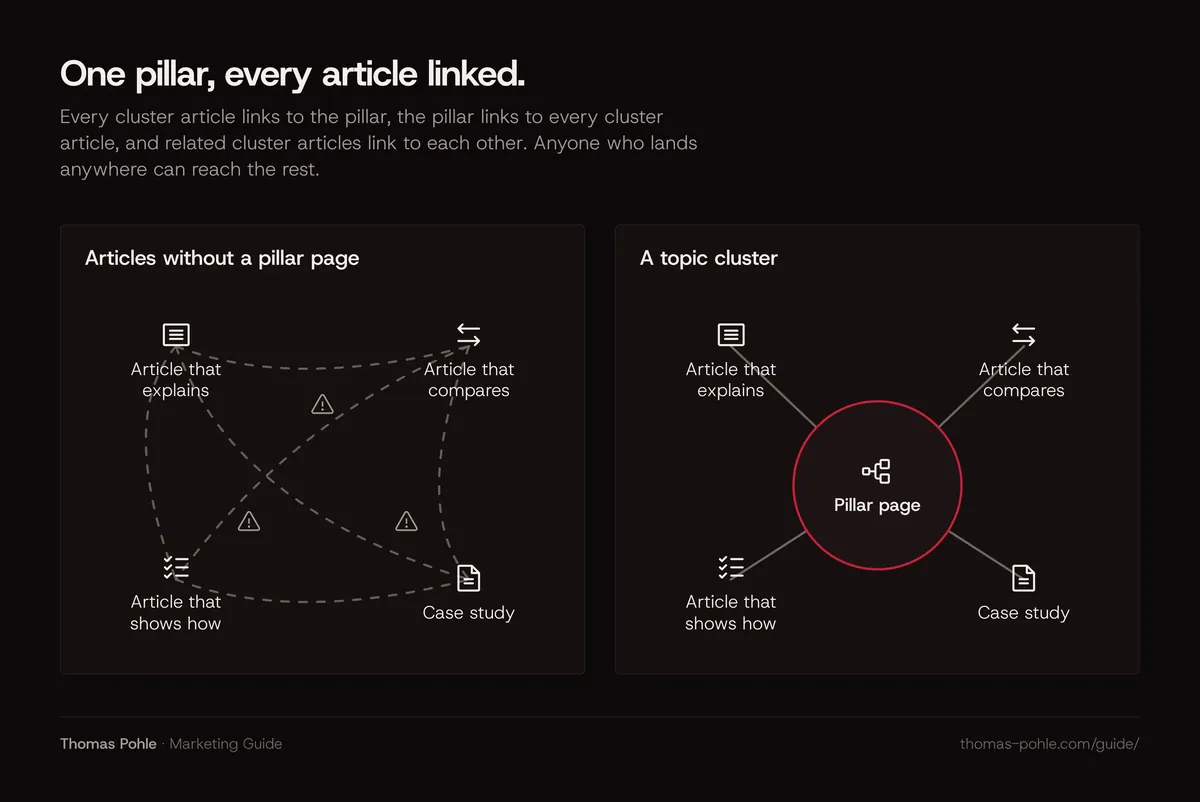
Authority comes from strong pages. Links alone won't create it. A cluster makes a body of strong pages easy to discover, easy to read in sequence and easy for Google to understand as one connected piece of expertise.
What is a topic cluster, exactly?
The term comes from content marketing practice. Google doesn't use it in its documentation. HubSpot, which popularized the model, describes a pillar page as a comprehensive resource page that covers a topic in depth, supported by content on subtopics that links back to it. HubSpot also states plainly that creating topic clusters in its tool doesn't affect SEO directly. So treat the structure as a planning method. Google reacts to the result: useful pages and clear links between them.
A cluster has three parts:
- The pillar page. It defines the topic, covers the main questions at a useful depth and links out to every cluster article where a reader would want more detail.
- Cluster articles. Each one answers a single question a buyer actually asks. One question per article, with the answer at the top.
- The links. Pillar to cluster, cluster to pillar, and cluster to cluster where the topics touch. Each link uses anchor text that says what the target page is about.
This guide works the same way. Each category has one pillar. For AI search, the pillar is what answer engine optimization is and how it differs from SEO. For SEO, it's the technical SEO checklist for B2B websites. This page is the pillar for content.
Why do internal links matter to Google and AI search?
Google states in its SEO starter guide that it primarily finds pages through links from pages it has already crawled. Its link guidance adds a direct rule: every page you care about should have a link from at least one other page on your site. A page with no internal links may still turn up through a sitemap. Google says a sitemap doesn't guarantee crawling or indexing, though.
Links also carry meaning. Google describes anchor text as the visible part of a link and says it tells users and Google something about the page you're linking to. A cluster gives you many natural places to use that signal well.
The same basics carry over to Google's AI features. In its documentation on AI Overviews and AI Mode, Google says there are no additional requirements or special optimizations needed to appear there. Among the fundamentals it lists is making your content easily findable through internal links. A page that's hard to reach is a weak candidate for any kind of search.
Two technical details matter here. Google can generally only crawl a link if it's an HTML a element with an href attribute. Links injected by JavaScript are fine as long as they use that standard markup. Buttons that change the page with a click handler and no href aren't reliable links. Does your CMS build navigation in an unusual way? Check the rendered HTML.
How should you write anchor text for internal links?
Google's guidance is short: good anchor text is descriptive, reasonably concise and relevant to the page it sits on and the page it links to. Its own bad example is the generic click-here link. Its good example simply names the target topic.
For B2B content, that means:
- Name the topic of the target page. "Our guide to schema markup for B2B websites" tells the reader where they are going. "Read more" and "this article" tell them nothing.
- Keep the link inside a real sentence. The words around a link tell the reader why it's there.
- Vary the wording naturally. Five links to the same page don't need the same exact phrase. Write the sentence first, then link the words that describe the target.
- Don't stuff keywords. An anchor that reads like a search query is harder to read and adds nothing.
- Describe image links with alt text. Google uses the alt attribute as the anchor text for linked images.
Google also says there's no magical ideal number of links a page should contain. Link where a reader would want to go next. A paragraph mentions a concept you've explained elsewhere? Link it. Otherwise, leave it.
How deep can a page sit before it gets lost?
Link depth is the number of clicks between a page and your homepage. Google doesn't publish a maximum. Its sitemap documentation describes a comprehensively linked site as one where Googlebot can find all the important pages by following links starting from the homepage, and proper linking as all important pages being reachable through some form of navigation.
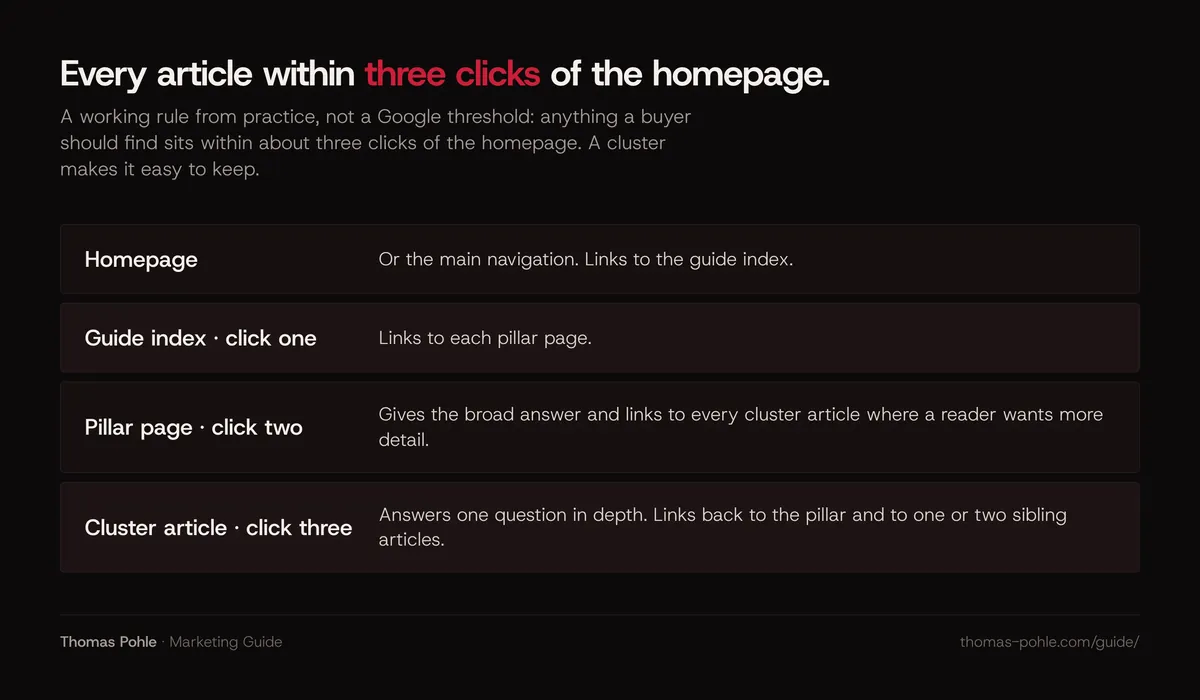
My rule of thumb for B2B sites: anything a buyer should find sits within about three clicks of the homepage. That's a habit from practice. Google sets no such threshold. A cluster makes the rule easy to keep. Homepage or main navigation links to the guide index, the index links to each pillar, and each pillar links to its cluster articles. Every article is then two or three clicks deep.
Google adds one note for larger sites. Once you pass a few thousand URLs, how you organize content can affect how Google crawls and indexes the site. Grouping topically similar pages in directories, such as /guide/, can help Google learn how often each section changes. For most SMB sites this is a minor point. Google advises against reorganizing a site just for this.
How do you find and fix orphan pages?
An orphan page is a page with no internal links pointing to it. It may sit in your sitemap or open by direct URL. No visitor clicking through your site will ever arrive there. In B2B sites, orphans are often old campaign landing pages, webinar recaps, case studies that were never added to a listing page, and blog posts that dropped off a paginated archive.
- List the pages you know about. Export the URLs in your XML sitemap and your CMS.
- List the pages your links reach. Run a site crawler from the homepage and export every URL it finds by following links.
- Compare the two lists. URLs in the first list but missing from the second are orphans.
- Check the internal links report. The Links report in Google Search Console shows your most internally linked pages and which pages link to each one. Google notes the report is a sample and its tables are capped at 1,000 rows. Use it as a check. It's no full inventory.
- Decide per page. Link it from the right pillar or cluster page, merge it into a stronger page and redirect, or remove it if it no longer serves anyone.
The full crawl setup is part of the technical SEO checklist. For measuring what happens afterwards, see how to measure organic and AI search visibility.
How do you plan 10 articles around one topic?
Start from your buyers' questions. Keyword tools come later, to check wording and demand. Google's own self-assessment for helpful content asks whether your site has a primary purpose or focus, and it warns against producing lots of content on many different topics in hopes that some of it performs. A cluster is the opposite. You go deep on one subject your company actually knows.
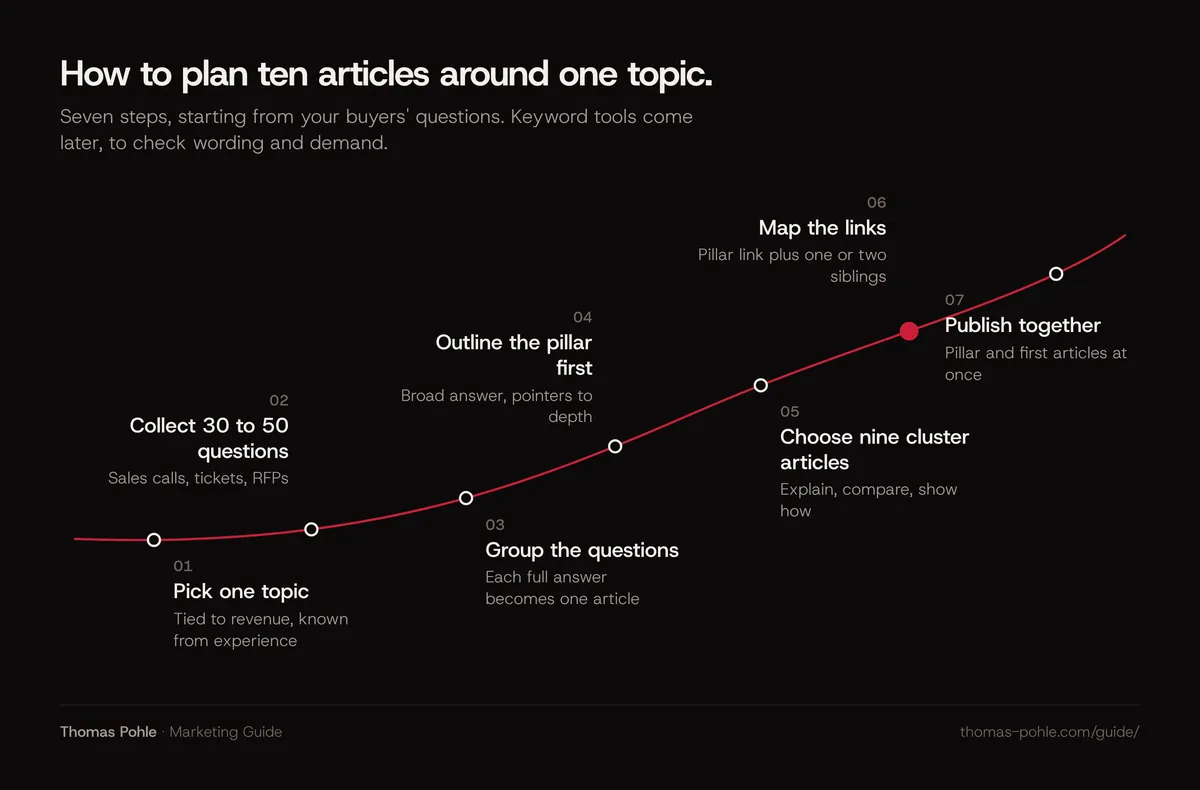
- Pick one topic tied to revenue. It should be a problem your product or service solves and a subject your team can speak about from experience.
- Collect 30 to 50 real questions. Use sales call notes, support tickets, RFP questions, onboarding calls and objections. Add what people search, using Search Console queries you already rank for.
- Group the questions. Merge duplicates. Each group that needs its own full answer becomes a cluster article. Questions that only need a sentence go into the pillar or into an FAQ.
- Write the pillar outline first. It answers the broad question in a few minutes of reading. It points to each cluster article at the moment a reader needs more depth.
- Choose nine cluster articles. Cover the stages of a buying decision. Some explain. Others compare or show how to do something.
- Map the links before you write. For each article, note the pillar link and one or two sibling links.
- Publish the pillar and the first cluster articles together. A pillar with no cluster articles to link to is just a long page.
Here's what a plan could look like for a hypothetical company selling cybersecurity services to mid-sized firms:
| Role | Question the page answers | Links to |
|---|---|---|
| Pillar | How should a mid-sized company approach cybersecurity? | All nine cluster articles |
| Cluster 1 | What does a security assessment include? | Pillar, 2, 3 |
| Cluster 2 | How much does a penetration test cost? | Pillar, 1 |
| Cluster 3 | Managed security service or in-house team? | Pillar, 4 |
| Cluster 4 | What should a security provider contract cover? | Pillar, 3 |
| Cluster 5 | How do you prepare an incident response plan? | Pillar, 6 |
| Cluster 6 | What should you do in the first 24 hours after a breach? | Pillar, 5 |
| Cluster 7 | How do you train employees to spot phishing? | Pillar, 8 |
| Cluster 8 | How do you secure remote and hybrid teams? | Pillar, 7 |
| Cluster 9 | How do you report security risk to the board? | Pillar, 1 |
Each article should show who wrote it and why they're qualified. That's covered in how to show expertise to Google and AI. Mark up the articles and breadcrumbs as described in which schema markup a B2B website needs.
One more caution from Google's guidance: don't write to a target word count because you heard Google prefers one. Make each cluster article as long as its question requires.
What should you check this week?
- Pick one topic and name the pillar page. If it exists, note its URL. If it doesn't, put it first on the content plan.
- Open the pillar and check that it links to every related article with descriptive anchor text.
- Open each related article and check that it links back to the pillar near the top or at the first natural mention.
- Search your site for click-here, "read more" and "learn more" links. Rewrite them to name the target page.
- Run a crawl from the homepage and compare it with your sitemap to find orphan pages.
- Check that every important page is reachable within about three clicks of the homepage.
- View the rendered HTML of your navigation and confirm links use
aelements withhref.
What topic clusters will not do
A cluster won't make thin pages rank. Ten shallow articles linked to each other are still ten shallow articles. Google's spam policies call out generating many pages without adding value for users, whether those pages come from AI tools or anything else. Expertise still has to be on the page. Links only make good content easier to find and easier to read as a whole.
My take: in B2B, the best clusters grow out of what the sales team hears every week. Those questions are specific. They map to real buying decisions. And your team can answer them better than any generic publisher. Want help choosing the first topic and mapping the cluster with your team? That's what a one-day Momentum Workshop is for.
Frequently asked questions
How many articles does a topic cluster need?
There's no required number, and Google doesn't define one. My rule of thumb: a pillar with five to ten cluster articles is a practical start for most B2B companies. It covers the main buyer questions without spreading the team thin. Add articles when real questions come up in sales or support. Never to hit a count.
Should the pillar page target the broadest keyword?
The pillar answers the broad question your buyers ask about the topic. That often lines up with the broader search term. Write it for the reader first. Give a complete overview, answer the main question at the top, and link to the cluster articles wherever a reader would want more depth on one part.
Do internal links pass authority between pages?
Google confirms that it discovers pages through links and that anchor text tells it what the linked page is about. It doesn't publish how much ranking value an internal link carries. So act on what's documented. Link important pages often, from relevant pages, with descriptive anchor text.
Can I use the same anchor text for every link to one page?
You can. You don't need to. Google asks for anchor text that's descriptive, reasonably concise and relevant to both pages. Write natural sentences and link the words that describe the target. Small variations read better. Keyword-stuffed anchors make the text harder to read, with no documented benefit.
Do I need a sitemap if my internal linking is good?
Google says a site that's comprehensively linked internally, where important pages can be reached by following links from the homepage, may not need a sitemap. Most B2B sites should still have one. It's cheap and helps with new or rarely linked pages. It doesn't guarantee that pages get crawled or indexed.
Sources
- Google Search Central: SEO Starter Guide
- Google Search Central: Link best practices for Google
- Google Search Central: Learn about sitemaps
- Google Search Central: AI features and your website
- Google Search Central: Creating helpful, reliable, people-first content
- Google Search Central: Spam policies for Google web search
- Search Console Help: Links report
- HubSpot Knowledge Base: What are pillar pages, topic clusters and subtopics

Thomas PohleB2B marketing advisor in Zurich. More than ten years in B2B marketing at Link11, Beekeeper and smino, most recently as Head of Marketing. CEO and co-founder of TEISENDA. Researched and drafted with AI tools, checked against the sources listed above. More about Thomas