What is marketing automation, and how do B2B companies use it?

Marketing automation is software that runs repeatable marketing steps by rules: it captures a contact, sends the right email at the right moment, scores interest and hands warm leads to sales. In B2B it only pays off when process and data come first. Define your stages, clean your contacts, settle consent. Then pick the tool.
This guide is for founders and marketing leads of small and mid-sized B2B companies who are about to buy a tool, or who already pay for one nobody really runs. I've built CRM and automation hands-on, and my first question is always the same: is there a process worth automating?
You get a plain definition, the workflows that matter in B2B, a readiness check with thresholds, the legal and deliverability rules for DACH, and a 90-day sequence to start.
What is marketing automation?
Marketing automation means software runs marketing tasks by predefined rules, so nobody has to do them by hand. A trigger, such as a form fill or a page visit, starts a workflow. The workflow checks conditions and acts: it sends an email, updates a field, adds a score or creates a task for sales.
It covers more than email. A typical platform combines a contact database, forms and landing pages, email, workflows, lead scoring and reporting. Many tools also sync with a CRM, or are part of one. The rule is what makes it automation. The same input always leads to the same next step, and nobody has to remember it.
| Element | What it does | What it gives you |
|---|---|---|
| Contact database | Stores people, companies, consent and activity | One record per contact instead of spreadsheets |
| Forms and landing pages | Capture new contacts with source and consent | Clean data at the point of entry |
| Sends newsletters and triggered messages | Follow-up that happens on time, every time | |
| Workflows | Run if-this-then-that rules across tools | Fewer manual handoffs and forgotten leads |
| Lead scoring | Rates fit and engagement with points | A shared rule for when sales should call |
| Reporting | Tracks stages, conversions and sources | A view of what marketing adds to pipeline |
How does marketing automation work in a B2B company?
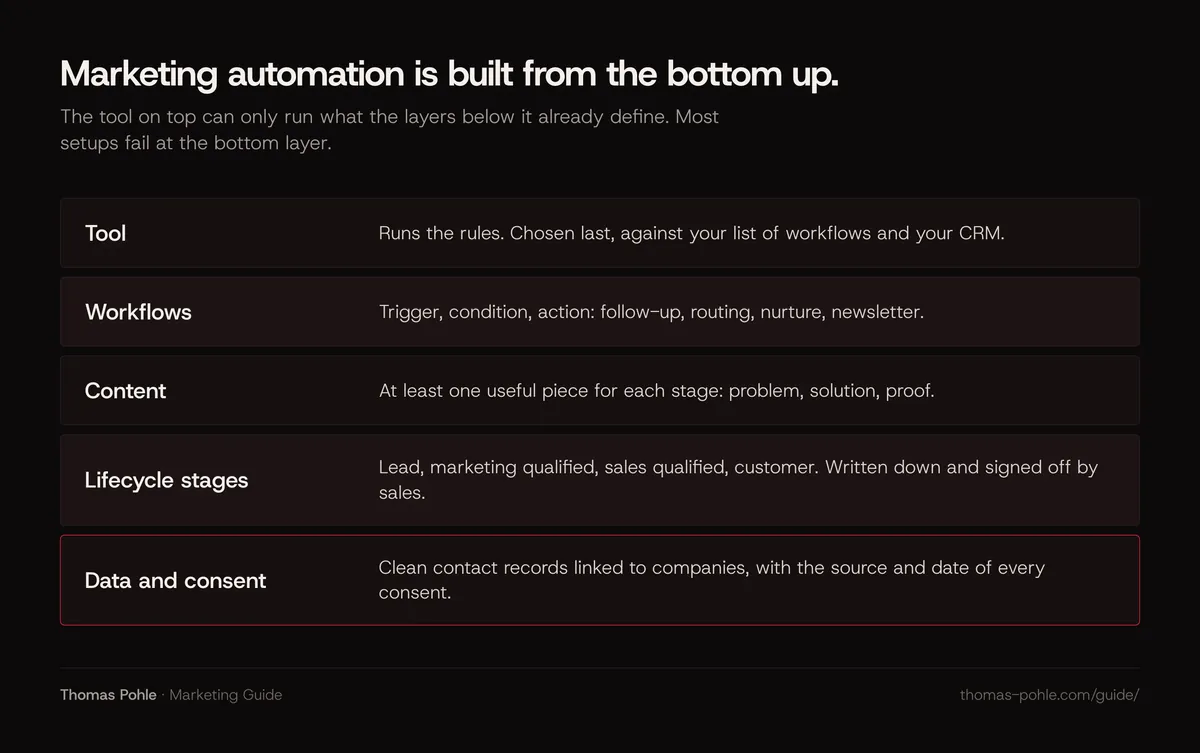
In B2B, marketing automation connects three things that usually live apart: what a contact does, what you know about their company and what sales needs to act. It works in layers. Data and agreed stages sit at the bottom. Content and workflows run on top. The tool only executes what those layers define.
Here's how it plays out. A plant manager downloads a checklist from your website. The form records source and consent. A workflow sends the checklist, waits a few days and sends a related case study. Later the contact visits the pricing page, and their company matches your ideal customer profile. The score crosses a threshold. The account owner gets a task with the full history attached.
B2B adds two complications. First, several people decide. You need contacts linked to companies and deals, and a mailing list won't do. Second, most of the market isn't buying right now. Professor John Dawes of the Ehrenberg-Bass Institute estimates that up to 95 % of business buyers are out of the market for many goods and services at any one time, with corporate clients switching providers such as their main bank or law firm roughly every five years. Automation keeps you useful to that 95 % until they're ready, without a person tracking every contact.
Which marketing workflows should you automate first?
Automate the workflows that run often, follow a clear rule and cost you money when someone forgets them. In most B2B companies that's four: the follow-up after a form fill, lead routing to the right salesperson, a short nurture sequence for contacts who aren't ready, and the newsletter. Lead scoring and complex branching come later.
Follow-up after a form fill
Someone asks for a guide, a webinar or a demo. The confirmation, the asset and a useful second message go out automatically. My take: this is the workflow with the clearest payoff. The alternative is often days of silence.
Lead routing and handover
New leads land with the right person based on region, company size or product, with a task and a deadline. Write down when a lead counts as ready for sales before you build the rule. Skip that, and the workflow just automates an argument.
Nurture sequences
A drip sequence of three to five emails gives contacts who aren't ready a reason to remember you. One problem per email, one useful piece of content, one low-pressure next step. Exit rules matter as much as the emails: a contact who books a meeting leaves the sequence. Nurture is one part of the wider question of how B2B companies generate qualified leads.
Newsletter and lead scoring
A regular newsletter keeps the whole database warm. Lead scoring comes once you have enough history to know which signals precede a deal. HubSpot's documentation, for example, separates fit scores, based on properties like job title or company size, from engagement scores, based on actions like website visits or email clicks. Start with fit. It's easier to agree on.
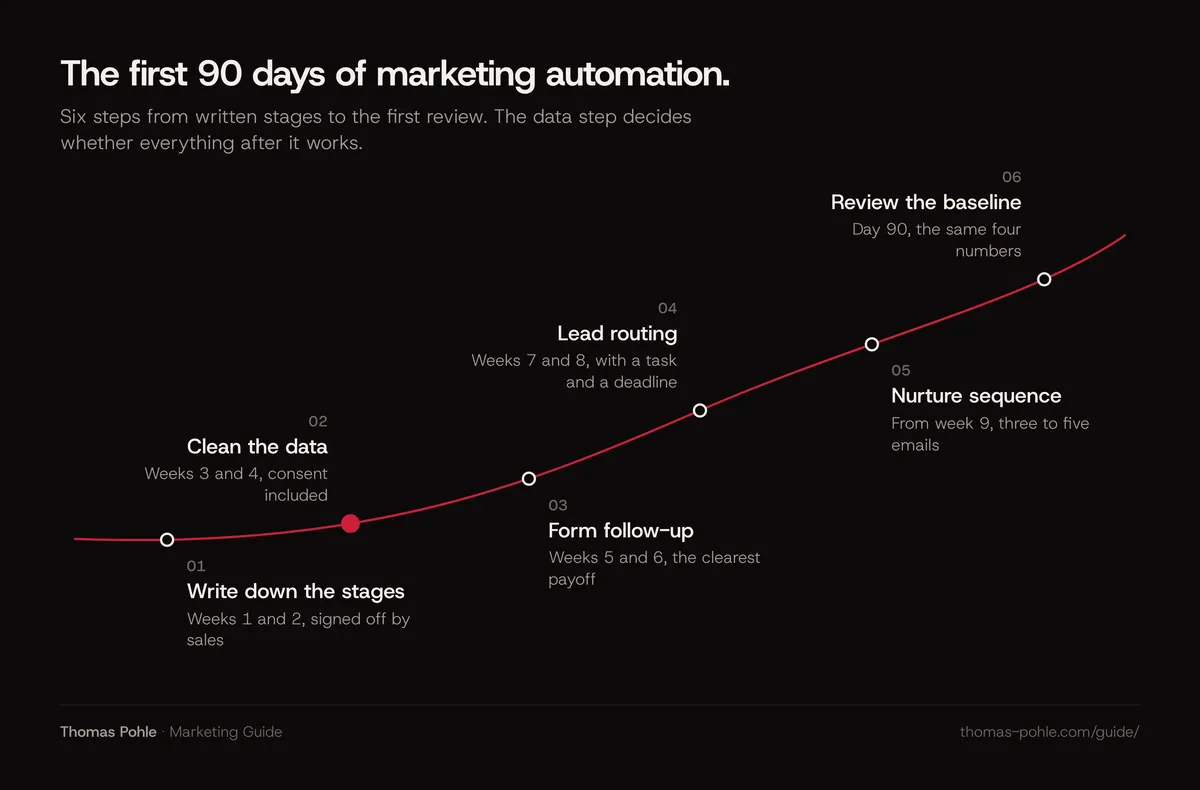
A realistic order for the first 90 days: lifecycle stages in weeks one and two, data and consent in weeks three and four, the form follow-up in weeks five and six, lead routing in weeks seven and eight, the nurture sequence from week nine, and a review of the baseline numbers at day 90.
What has to be in place before you buy a tool?
Before you buy, you need an owner, written lifecycle stages agreed with sales, contact data you trust, documented consent and enough content for each buying stage. Without these, a new platform automates the current chaos. With them, even a simple tool works. Most companies don't need more software. They need better systems.
That last line is my view. It's why I start every automation project with a readiness check and never with a tool demo. The thresholds below are my rules of thumb. They don't come from research. Adjust them to your size, but don't skip a row.
| Check | Threshold to pass | If you miss it |
|---|---|---|
| Owner | One named person with at least half a day per week for the system | Don't buy yet. Assign the owner first |
| Lifecycle stages | Written definitions for lead, marketing qualified, sales qualified and customer, signed off by sales | Run one workshop with sales before any workflow |
| Contact data | Company, role, country and source filled for at least 80 % of the contacts you plan to email | Clean and deduplicate before you import |
| Consent | Source and date of consent stored for every contact you send marketing email to | Email only contacts with documented consent |
| Content | At least one useful piece for each stage: problem, solution, proof | Write the missing piece before the nurture sequence |
| Volume | Roughly 50 or more new contacts per month | Below that, CRM sequences and a newsletter tool are usually enough |
The volume row matters most for small teams. My rule of thumb: with a handful of new contacts a month, a salesperson can follow up personally, and that beats any sequence. Automation earns its cost when manual follow-up starts to slip.
How do CRM and marketing automation work together?
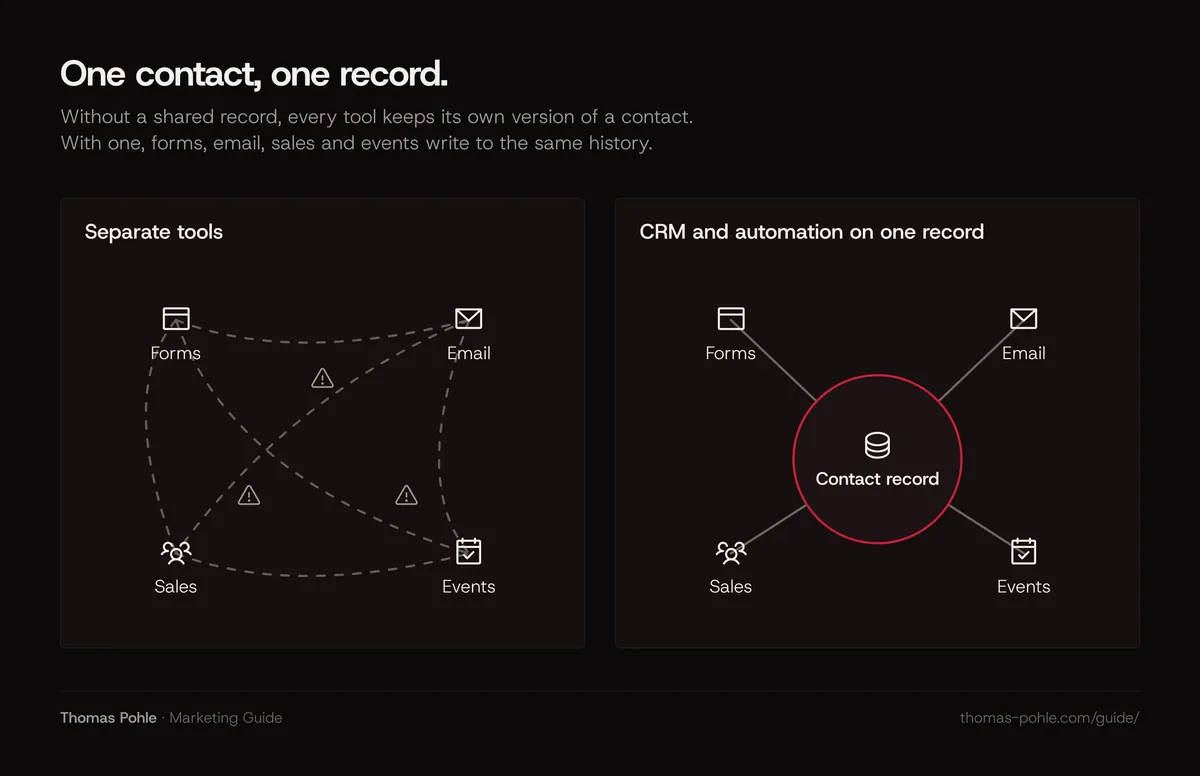
The CRM is the system of record for accounts, contacts and deals. Marketing automation reads from it and writes back to it. When both share one contact record, sales sees every email, download and visit, and marketing sees which contacts turned into pipeline. When they run apart, both teams work from different versions of the truth.
The real decision: use your CRM's automation module, or a separate platform synced to it. For most small and mid-sized B2B teams, one system wins. No sync errors, one login, one place for consent. A separate platform makes sense when marketing runs at a scale or complexity the CRM can't handle.
My take: the best reason to change systems is a reporting need. A feature list rarely is. In a previous in-house role I moved the CRM from Pipedrive to HubSpot for exactly that: to get full-funnel targets and reliable forecast reporting.
Whatever you choose, agree on three things in writing: which system owns which field, which stage changes trigger a sync and who fixes a conflict. In my experience, those three agreements prevent most sync conflicts before they happen.
What do the rules on consent and email delivery require?
In DACH, marketing email generally needs prior consent, with a narrow exception for existing customers. Germany's unfair competition law and Swiss law both follow this opt-in principle, and the GDPR gives every contact the right to object to direct marketing at any time. Gmail adds technical rules for bulk senders that decide whether your emails arrive at all.
- Germany. Section 7 of the Act against Unfair Competition (UWG) treats email advertising without prior express consent as an unacceptable nuisance. The existing customer exception applies only if you got the address in connection with a sale, advertise your own similar products, the customer hasn't objected, and you point out the right to object at collection and in every email.
- Switzerland. According to the Federal Office of Communications (OFCOM/BAKOM), automated mass advertising by email is allowed only with explicit consent. The exception covers sellers who received the address during a purchase and advertise products of the same type. The sender must be named, and every message needs an easy, free way to refuse further messages.
- EU data protection. Under Article 21 of the GDPR, a person may object at any time to processing for direct marketing, including related profiling, and the data may then no longer be used for that purpose. Your automation must stop on an unsubscribe. Everywhere, immediately.
- Gmail. Since February 2024, senders of more than 5,000 messages a day to Gmail accounts must set up SPF, DKIM and DMARC, support one-click unsubscribe in marketing messages, and keep the spam rate reported in Postmaster Tools below 0.30 %. One-click unsubscribe is defined in RFC 8058.
This is a summary. It isn't legal advice. Austria and other markets have their own rules, so check them with counsel before you email across borders. My rule of thumb for DACH: double opt-in with stored proof of consent is the safest default.
How do you choose a marketing automation tool?
Choose the tool last. Hold it against a written list of the workflows you defined, the CRM you use and the people who'll run it. The best tool is the one your team actually operates every week. Compare on CRM integration, data hosting and contracts, ease of building workflows, reporting and total cost including setup and training.
Three questions narrow the field fast:
- Does it fit your CRM? A native module or a proven two-way sync beats feature lists.
- Where is the data, and is there a data processing agreement? For DACH buyers, this often decides the shortlist.
- Who builds and maintains it? A tool that needs a specialist for every change stalls the moment that person is busy.
Open source platforms are an option if you have technical capacity in-house and want full control over hosting. You trade license cost for operating work. Updates, deliverability and security become your job.
My take: AI changes the build work more than the strategy. It can draft emails, suggest segments and summarize a contact's history for sales. My rule for AI applies here too. It should remove complexity. Another tool only adds it. The broader approach is in the guide on where a B2B company should start with AI in marketing.
How do you know whether marketing automation pays off?
Measure automation by what it changes in pipeline: speed of follow-up, meetings booked from nurtured contacts, the share of leads sales accepts and deals that touched an automated workflow. Open rates are a weak signal today. As far as I can see, public evidence on the return of marketing automation comes mostly from vendor surveys. Measure your own baseline.
Open rates lost most of their meaning when Apple introduced Mail Privacy Protection. Apple says its Protect Mail Activity feature downloads remote content in the background by default, whether or not the user engages with the email. Tracking pixels can fire without a human reading, so opens can be inflated for Apple Mail users. Use clicks, replies and meetings instead.
Before you switch anything on, write down four numbers: average time from form fill to first sales contact, leads per month, the share of leads sales accepts, and meetings per month from marketing sources. Check them again after 90 days. Faster follow-up and more accepted leads mean the setup works. For reporting, the approach in measuring organic and AI search visibility without heavy tracking transfers well: few numbers, collected the same way every month.
For a smaller company, the honest answer is often to start with the CRM you already have. Its sequences and forms cover the first two workflows. Upgrade when the readiness check passes and manual follow-up becomes the bottleneck. How these numbers fit the bigger picture is covered in how to measure marketing success in a B2B company.
What to do this week
- Name one owner for marketing automation and block half a day per week in their calendar.
- Write your lifecycle stages on one page and get sales to sign off on the definition of a sales-ready lead.
- Export your contacts and check how many have company, role, country, source and consent filled.
- List the four workflows you'd automate first and the content each one needs.
- Check your sending domain for SPF, DKIM and DMARC and test one-click unsubscribe.
- Record your baseline: time to first contact, leads per month, accepted leads, meetings.
- Only then book tool demos, with your workflow list in hand.
Content is what keeps nurture sequences worth reading. If you need assets for each buying stage, start with the guides on planning topic clusters and writing a B2B case study.
Want the foundation set up with your team instead of on your own? A one-day Momentum Workshop covers stages, data and the first workflow.
Frequently asked questions
What is the difference between marketing automation and a CRM?
A CRM is the system of record for accounts, contacts and deals. Sales works in it every day. Marketing automation runs rules on top of that data: it sends emails, scores leads and triggers handovers. Many CRMs now include automation modules, so for smaller B2B teams the two often live in one system. That avoids sync errors and keeps consent in one place.
Is marketing automation worth it for a small B2B company?
Usually not as a separate platform at first. With fewer than about 50 new contacts a month, personal follow-up by sales plus your CRM's sequences and a newsletter tool cover the need. A dedicated platform pays off when manual follow-up starts to slip, when several people need the same contact history, or when nurture sequences run for many segments at once.
Do I need double opt-in for B2B email in Germany and Switzerland?
The law requires prior consent for marketing email, with a narrow exception for existing customers. It doesn't prescribe a specific technique. Double opt-in is the common way to prove consent: the contact confirms by clicking a link, and you store the proof. This is general information. It isn't legal advice, so check specific cases with counsel.
How long does it take to set up marketing automation?
A basic setup with clean data, agreed stages and two or three workflows can run within about 90 days, if one person owns it. The tool is rarely the slow part. Agreeing stage definitions with sales, cleaning contact data and writing the content the sequences need take the time. Lead scoring and complex branching come later, once you have real data.
Are email open rates still useful for measuring automation?
Only with caution. Apple's mail privacy feature downloads remote content in the background whether or not someone reads the email, which can inflate opens for Apple Mail users. Clicks, replies, meetings booked and leads accepted by sales tell you far more reliably whether a workflow works.
Sources
- Google Workspace Admin Help: Email sender guidelines
- RFC 8058: Signaling One-Click Functionality for List Email Headers
- Gesetz gegen den unlauteren Wettbewerb (UWG), § 7 Unzumutbare Belästigungen
- OFCOM (BAKOM): When is mass sending allowed?
- Regulation (EU) 2016/679 (GDPR), Article 21 Right to object
- Apple: Mail Privacy Protection and privacy
- HubSpot Knowledge Base: Understand the lead scoring tool
- Ehrenberg-Bass Institute, John Dawes: Advertising effectiveness and the 95-5 rule

Thomas PohleB2B marketing advisor in Zurich. More than ten years in B2B marketing at Link11, Beekeeper and smino, most recently as Head of Marketing. CEO and co-founder of TEISENDA. Researched and drafted with AI tools, checked against the sources listed above. More about Thomas