How do you optimize your website for AI search?

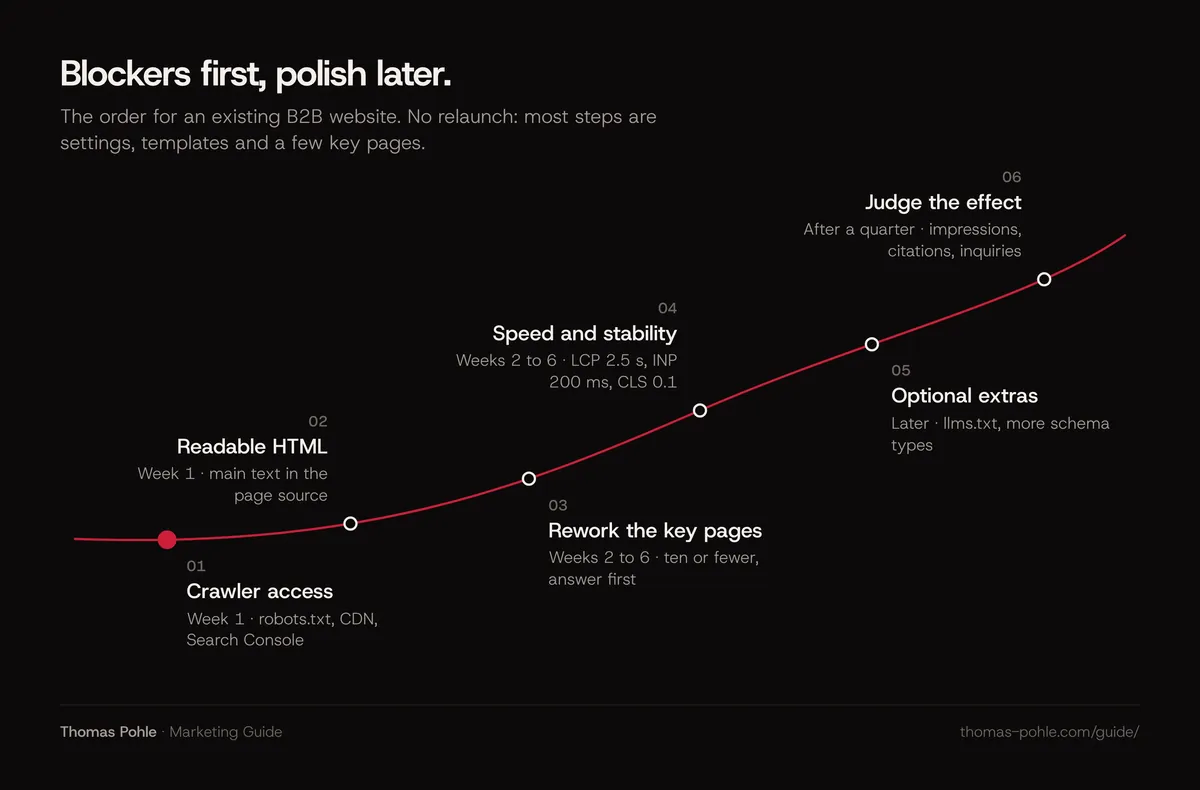
Fix what blocks access first. Then fix what limits quoting. Everything else waits. In week one, check that search crawlers get through robots.txt and your CDN, that key pages return HTTP 200 with their main text in the raw HTML, and that Search Console still includes you in AI features. That's the order for an existing website.
This checklist is for B2B teams with a website that works and no budget for a relaunch. You get a triage in four tiers, the thresholds that decide whether a check passes, a worked example for a 40-page site and a list of things you can safely skip. The strategic view of how SEO changes with AI is in the pillar guide on how SEO changes when AI answers the search.
What does optimizing an existing website for AI search involve?
Optimizing an existing website for AI search is a triage job. Google says its AI Overviews and AI Mode rest on its core ranking systems and retrieve pages from its normal search index. So the work is mostly SEO you may have skipped. What matters is the order: blockers first, then pages, then polish.
I sort every check into one of four tiers:
- Week one. Anything that can keep you out of AI answers entirely: blocked crawlers, missing index eligibility, content that crawlers can't read.
- Weeks two to six. Anything that limits how well your best pages can be quoted: structure, proof, speed.
- Later. Useful extras with small or unproven effect, such as llms.txt or additional schema types.
- Skip. Tactics Google explicitly calls unnecessary or that risk its spam policies.
What must be fixed in week one?
Week one removes everything that can make a page invisible to AI answers, however good it is. That means crawler access in robots.txt and at the CDN, index and snippet eligibility, the new AI control in Search Console, working status codes and a verified presence in Bing. Each check below has a clear pass threshold.
| Check | Passes when | Tier |
|---|---|---|
| robots.txt | Googlebot, Bingbot, OAI-SearchBot and PerplexityBot are not disallowed for your key pages | Week one |
| CDN and bot protection | Requests from these crawlers get HTTP 200, not a challenge page or 403 | Week one |
| Search Console AI control | Settings show your site included in Search generative AI features | Week one |
| Index and snippet controls | No noindex, nosnippet or very low max-snippet on pages you want cited | Week one |
| Raw HTML | The main text of each key page is in the HTML source before JavaScript runs | Week one |
| Bing Webmaster Tools | Site verified, sitemap submitted, key pages indexed | Week one |
| Answer-first sections | Each key heading is followed by a complete answer within about 60 words | Weeks two to six |
| Core Web Vitals | LCP up to 2.5 s, INP up to 200 ms, CLS up to 0.1 at the 75th percentile | Weeks two to six |
| Sitemap lastmod | Dates change only when the main content changes | Weeks two to six |
| llms.txt, extra schema types | Optional; no effect on Google Search | Later |
Three of these checks deserve a closer look, because they fail silently. Since 31 August 2026, every site has a Search generative AI control in Search Console settings. Inclusion is the default. But an excluded site stops appearing in AI Overviews, AI Mode and Discover AI features, and Google says changes generally take a few days to apply. Ask whoever owns the property whether anyone has touched it.
The second is the CDN. On 1 July 2025 Cloudflare announced it was changing its default to block AI crawlers unless they pay. Whether that default applies to your account depends on your settings. Check them. Don't assume. The third is the difference between search and training crawlers. Blocking GPTBot is a training decision. OpenAI says sites that opt out of OAI-SearchBot won't be shown in ChatGPT search answers. The full crawler table is in the guide on getting cited by ChatGPT, Perplexity and Google AI.
Can AI crawlers read your pages without JavaScript?
Don't assume every AI crawler sees what your browser shows. Google renders JavaScript with a headless Chromium. It also says server-side or pre-rendering is still a great idea, because not all bots can run JavaScript. If your main text only appears after scripts run, some assistants may never read it.
In an analysis of traffic on its network published in December 2024, Vercel found that none of the major AI crawlers it observed, including GPTBot, ClaudeBot and PerplexityBot, rendered JavaScript at the time. That's one vendor's log data. It isn't provider documentation, and it may have changed since. Still reason enough to test.
The test takes five minutes per template:
- Open a key page, choose "View page source" (skip the element inspector) and search for a sentence from the middle of the main text.
- If the sentence is missing, JavaScript loads the text. Note which template it is: product page, blog post, pricing.
- Ask your developer or agency whether that template can be server-rendered or pre-rendered. Most modern frameworks support it.
- Check that prices, feature lists and FAQs are text. Images or accordions that load on click don't count.
Fix templates. Individual pages come second. One change to the blog template fixes every article at once, which is why this belongs in week one.
Which pages should you rework first?
Rework the handful of pages that already carry your organic value and the pages that answer what buyers ask sales. Usually that's ten or fewer. In B2B a few pages typically carry most of the organic value, so improving those beats publishing new ones. Search Console shows which pages earn impressions. Your sales team knows which questions decide deals.
Here's a typical scenario: a Swiss software company with 40 pages and a relaunch planned for next year. Search Console shows that 8 pages get almost all impressions. Sales names five questions every prospect asks, and three of them have no page that answers them directly. So the plan for weeks two to six is the 8 pages plus 3 sections added to existing pages. That's 11 pieces of work in total, with no new URLs. The other 29 pages wait.
How do you rework a page so assistants can quote it?
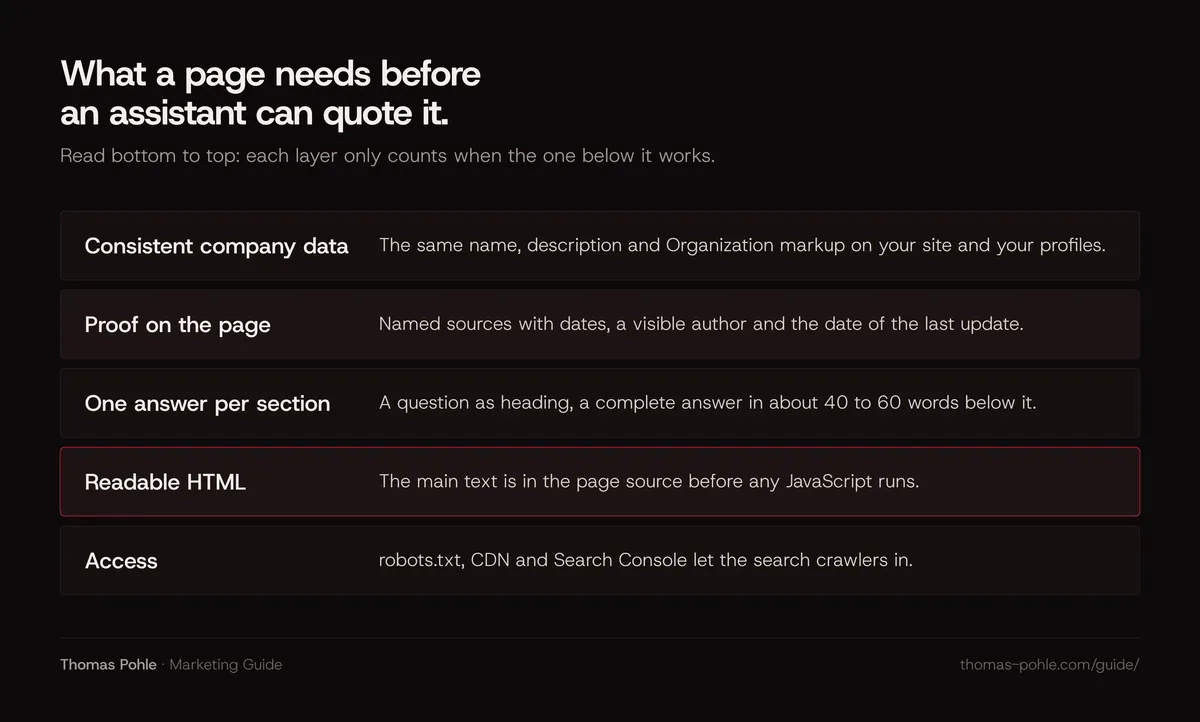
A page is easy to quote when each section opens with a complete answer to its heading, names the subject instead of saying "it", and backs claims with sources that are on the page. Google says you don't need to write in a special way for its AI features. The same structure simply makes the page clearer for readers and for other assistants.
Google's guide states there's no need to chunk content or rewrite it just for AI systems. Bing recommends clear headings, tables and FAQ sections, plus examples, data and cited sources. My take on both: write well-structured pages for people, and you've done the AI part.
My checklist for each of the selected pages, with the threshold I apply:
- Heading as a question. At least every second H2 is phrased the way a buyer would ask it.
- Answer first. The paragraph under each heading answers it completely in about 40 to 60 words.
- One subject per sentence. No opening sentence that depends on the paragraph before it.
- Proof on the page. Every number has a named source and a date. The page shows its author and its last update.
- Real text. Pricing tables, specifications and comparisons are HTML. Pictures of text don't count. Google asks for important content in textual form.
- Your own angle. At least one thing per page that only you can say: a process, a criterion, a number from your work. Google calls this non-commodity content.
For bylines, author pages and how to show experience without exaggerating, see the guide on E-E-A-T for B2B.
Is your site fast and stable enough?
Your site is fast enough when it passes Core Web Vitals at the 75th percentile: Largest Contentful Paint within 2.5 seconds, Interaction to Next Paint of 200 milliseconds or less and Cumulative Layout Shift of 0.1 or less, measured separately for mobile and desktop. Google lists page experience among its best practices for AI features.
My take: in B2B, Core Web Vitals are a hygiene factor. Get them green, then spend the time on content. On my own site the wins were unglamorous. Long main-thread tasks of 936, 784 and 462 milliseconds from animation code went to zero after a rebuild. The font file shrank from 80 KB to 32 KB with a switch to WOFF2. None of that needed a relaunch.
Fix the failing template first, starting with the one your selected pages use. The details are in the technical SEO checklist for B2B websites.
What can wait, and what can you skip?
Several popular AI tactics can wait. Some you can skip. Google states that its search doesn't use llms.txt or other special AI files, that structured data isn't required for its AI features, that content doesn't need to be chunked, and that creating pages for every query variation can violate its scaled content abuse policy.
| Tactic | What Google says | My call |
|---|---|---|
| llms.txt file | Google Search ignores it; it neither helps nor harms | Later, if other tools you care about read it |
| Extra schema.org types for AI | Not required, no special markup exists | Later; keep Organization and Article markup accurate |
| Chunking pages into fragments | No requirement; there is no ideal page length | Skip |
| Pages for every fan-out query | Can violate the scaled content abuse policy | Skip |
| Buying or seeding mentions | Inauthentic mentions are less helpful than they seem | Skip; earn real ones |
| A full relaunch | Not mentioned as a requirement | Only when the CMS cannot be fixed |
The honest status of llms.txt, including what other providers say, is in the guide on whether your website needs an llms.txt file. My own site has one next to JSON-LD for Person and ProfessionalService. I treat the file as an inexpensive extra. Don't expect it to move anything.
How do you know whether the changes worked?
The changes worked when the platforms report more AI visibility for the pages you reworked and more inquiries mention AI assistants. Search Console's generative AI report shows impressions in AI Overviews and AI Mode by page, country and date. Bing's AI Performance report shows citations and sample grounding queries for Copilot.
- Before you start. Export AI impressions per page from Search Console and citations from Bing for the last 28 days. Without this baseline you can't tell anything later.
- Server logs. Confirm that OAI-SearchBot, PerplexityBot and Bingbot requests to your key pages return 200 after the week-one fixes.
- Sales. Ask every new inquiry where they first heard of you. Log the answers that name an assistant.
- Timing. OpenAI says robots.txt changes take about 24 hours to reach its systems. Rewritten pages need to be recrawled, so judge content changes over a quarter.
The full reporting setup is in the guide on measuring organic and AI search visibility.
What to do this week
- Open robots.txt and confirm Googlebot, Bingbot, OAI-SearchBot and PerplexityBot aren't blocked from your key pages.
- Ask your hosting or CDN provider to confirm these crawlers receive HTTP 200 and no challenge page.
- Check Search Console under Settings, Search generative AI, and confirm your site is included.
- Search the page source of your three main templates for a sentence from the main text.
- Verify your site in Bing Webmaster Tools and submit your sitemap.
- Export your baseline: AI impressions per page from Search Console and citations from Bing.
- Pick up to ten pages for weeks two to six, by impressions and by what sales hears.
Most of this list is configuration. Very little is content. My take: it's the part teams skip most easily, because it sits between marketing and IT. Once access and readability are solved, every hour on content counts. Want to go through the triage with your team and leave with the page list? That's what a Momentum Workshop is for.
Frequently asked questions
Do I need a new website to rank in AI search?
Usually not. Google says there are no additional technical requirements for its AI features beyond normal search eligibility. An existing site that's crawlable, indexed and readable qualifies. A relaunch only makes sense when the content management system can't serve main text in HTML, can't be made fast enough, or can't be edited by your team.
How long does it take to optimize a website for AI search?
The week-one checks take a few days if someone has access to robots.txt, the CDN and Search Console. In my planning, reworking up to ten key pages fits into four to six weeks. Crawler changes reach OpenAI in about 24 hours by its own account. Rewritten pages need a recrawl, so expect to judge results over a quarter.
Should I block GPTBot to protect my content?
That's a separate decision from AI search visibility. GPTBot collects content that may be used for training OpenAI models. OAI-SearchBot decides whether you can appear in ChatGPT search answers. You can block GPTBot and still allow OAI-SearchBot. Decide based on whether your text is your product, and write the decision down.
Does structured data help my pages appear in AI Overviews?
Google says structured data isn't required for its generative AI features and that no special schema.org markup exists for them. It still recommends structured data for rich results, and it must match the visible text. Keep accurate Organization, Person and Article markup. Don't expect extra schema types to change AI visibility on their own.
Can I test what an AI assistant sees on my page?
The simplest test is the page source. If a sentence from your main text is missing there, crawlers that don't run JavaScript can't read it. Then check your server logs for requests from OAI-SearchBot, PerplexityBot and Bingbot and their status codes. Asking an assistant about your page shows what it answers. It won't show you why.
Sources
- Google Search Central: Optimizing your website for generative AI features on Google Search
- Google Search Central: AI features and your website
- Search Console Help: Search generative AI control
- Google Search Central Blog: Introducing Search Generative AI performance reports in Search Console (June 2026)
- Google Search Central: Understand JavaScript SEO basics
- web.dev: Web Vitals
- OpenAI: Overview of OpenAI crawlers
- Cloudflare Blog: Content Independence Day, no AI crawl without compensation (July 2025)
- Vercel: The rise of the AI crawler (December 2024)
- Bing Webmaster Blog: Introducing AI Performance in Bing Webmaster Tools Public Preview (February 2026)
- Google Search Central: Build and submit a sitemap
- Perplexity: Perplexity crawlers

Thomas PohleB2B marketing advisor in Zurich. More than ten years in B2B marketing at Link11, Beekeeper and smino, most recently as Head of Marketing. CEO and co-founder of TEISENDA. Researched and drafted with AI tools, checked against the sources listed above. More about Thomas