How do you get your content into Google AI Overviews?

To get content into Google AI Overviews, pick queries where an overview appears and buyers really ask. Check that the page is indexed and snippet-eligible. Then answer the main question and its sub-questions on one page, each in a short, self-contained passage, with facts only you can supply. Google gives no guarantee, so measure impressions per page.
This guide is for B2B teams whose topics have little search volume, often a few dozen searches a month. You get a scoring table for choosing queries, five steps per page, a worked example and what doesn't help. The strategy behind it is in the pillar guide on how SEO changes when AI answers the search. Site-wide fixes like crawler access are in the guide on optimizing your website for AI search.
What decides whether Google cites your page in an AI Overview?
Google cites pages that its normal ranking systems find relevant for the query or one of its sub-queries. A page must be indexed, eligible for a snippet and not excluded through the generative AI control in Search Console. Beyond that, Google says there are no extra technical requirements, and it guarantees nothing, even when every condition is met.
The mechanism that matters most for you is query fan-out. Google says AI Overviews and AI Mode may run "multiple related searches across subtopics and data sources" to build one answer. So your page competes for the sub-questions too, and a page that answers one sub-question better than anyone else can be cited even if it ranks lower for the main query.
The data points the same way. In an Ahrefs analysis of 863,000 keyword results pages from March 2026, only about 38 % of the pages cited in AI Overviews ranked in the top ten for that query; about 31 % weren't in the top 100. Ahrefs suspects fan-out behind the gap and notes that AI Overviews vary from run to run, so one check proves little.
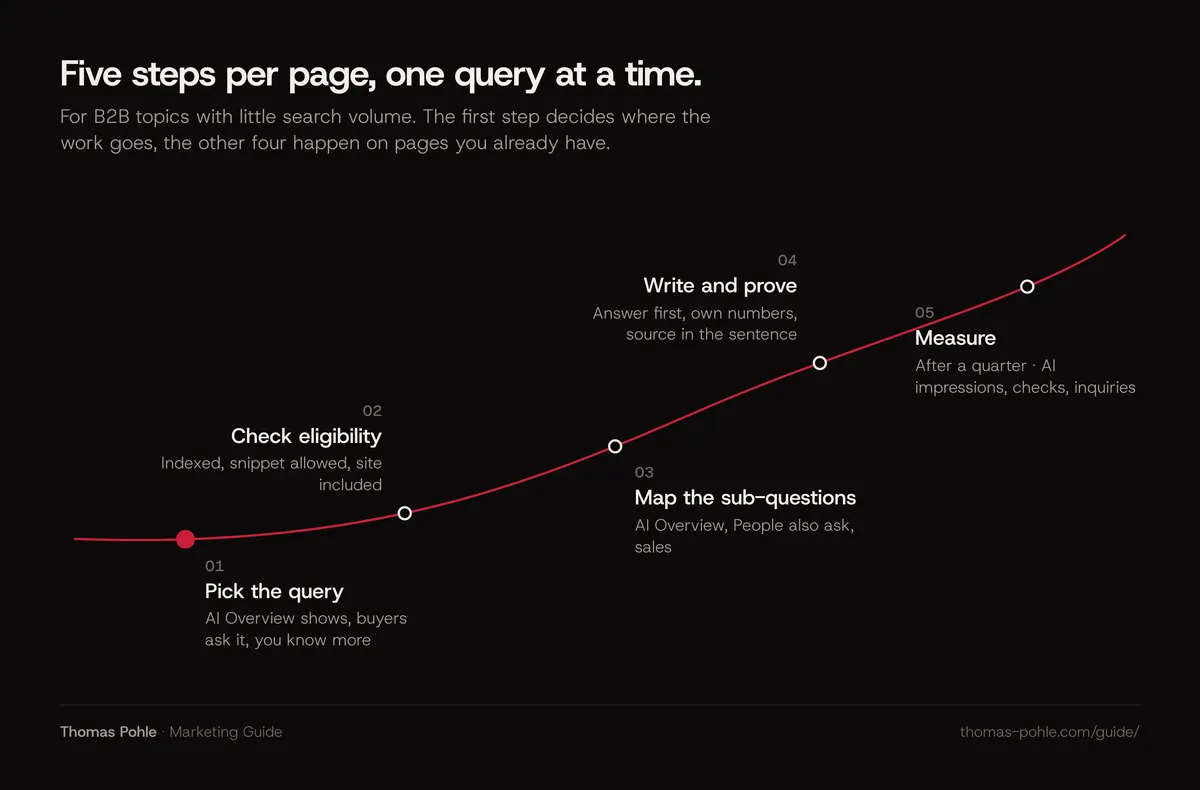
Which queries are worth the effort for a B2B site?
A query is worth the effort when an AI Overview actually appears for it, buyers ask it before they buy, and you can answer it better than the pages Google cites today. Search volume matters less than you think. Long, specific B2B questions often have little volume, and they're where AI Overviews show up most and where a specialist can still be the best source.
AI Overviews favor long, specific questions. Peec, an AI search tracking vendor, checked 500,000 mostly business prompts in April 2026: two-word queries got an AI Overview 64.6 % of the time, queries of eight to ten words 87.7 %. Peec doesn't disclose its method, so treat it as a direction. For commercial searches the 2026 data is clearer: in a Semrush panel of 400 commercial keywords, AI Overviews appeared on 88 % in August 2026, up from 45.75 % in September 2025.
I score each candidate query with four checks. The thresholds are my working rules, not a published standard.
| Check | Passes when | How to check |
|---|---|---|
| An AI Overview appears | In at least 2 of 3 checks on different days, in your target country | Search logged out or in a private window, note date and result |
| Buyers ask it | Sales hears the question at least once a month, or it shows in your Search Console queries | Ask sales, filter Search Console for question words |
| You have a better answer | You can add own numbers, a process or a judgment the cited pages lack | Read the cited pages and list what they leave out |
| A page fits | An existing page covers the topic, or the question deserves one of its own | Search your own site for the topic first |
Four passes: work on it this quarter. Three: work on it if the missing check is the first one, because AI Overviews keep spreading to more queries, as the Semrush data shows. Two or fewer: skip it.
A typical scenario: an IT service provider in Zurich that moves SMEs to Microsoft 365. Its guide page on migration ranks around position eight. The team finds six variants of "how long does a Microsoft 365 migration take" in Search Console, together a few dozen impressions a month. An AI Overview shows for four of the six in repeated checks. It cites Microsoft's documentation and two agency blogs, none of which give durations by company size. Sales hears the question in almost every first call. The team has its own project log. Four passes. The page gets reworked, no new URL.
How do you check that a page is eligible?
Check eligibility page by page before you rewrite anything. The page must be indexed, must allow snippets, and your site must be included in the generative AI features in Search Console. A single nosnippet tag or a missing index entry makes all later work useless, and none of these problems are visible on the page itself.
- Indexed. Run the URL through the URL Inspection tool in Search Console. "URL is on Google" is the pass. Check the canonical Google selected, too.
- Snippet allowed. Google's robots meta documentation says nosnippet keeps a page out of AI Overviews and AI Mode as a direct input, and max-snippet limits how much text can be used. Look for both in the page source and the HTTP headers.
- No hidden sections. The data-nosnippet attribute excludes parts of a page from snippets. Make sure it doesn't sit on the passage you want cited.
- Site included. Since 31 August 2026 every site has a Search generative AI control in Search Console settings. Inclusion is the default. Check that nobody changed it.
How do you find the sub-questions behind a query?
Collect the sub-questions from three places: the AI Overview itself, the related questions Google shows for the query, and what your sales team hears in calls. Google doesn't publish the fan-out queries it generates. These three sources come close, and they show you which parts of the answer a model is looking for.
- Read the current AI Overview and write down every point it makes. Each point is a sub-question someone answered.
- Open the "People also ask" box and note the questions that fit your buyer. Skip the consumer ones.
- Ask the follow-up questions in AI Mode that a buyer would ask next, and note what comes up.
- Ask sales which follow-ups come after the first question in a call. Those are usually the ones nobody answers well online.
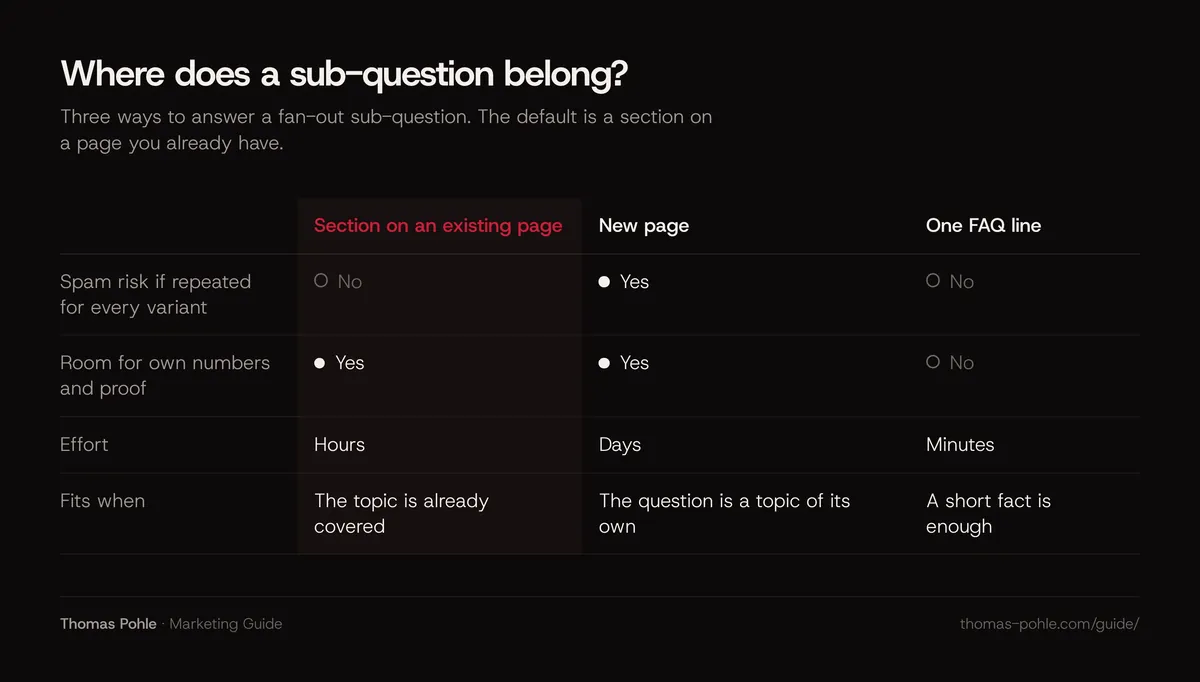
Then decide where each sub-question goes. Google's AI optimization guide says that creating content for query variations, fan-out queries included, primarily to manipulate rankings or AI responses violates its spam policy on scaled content abuse. So the default is one page with sections.
How do you write a section Google can cite?
Write each section so its first paragraph answers the heading completely in 40 to 60 words, names the subject instead of saying "it", and holds a fact the reader can check. Google says you don't need to split content into tiny pieces or rewrite it for AI.
- Heading as the question. Phrase it the way the buyer asks. "How long does a Microsoft 365 migration take for 50 employees?" beats "Timeline".
- Answer first. The first sentence gives the answer, with a range or a number where possible.
- Self-contained. The passage must make sense if it's the only thing someone reads. No "as mentioned above".
- Source in the sentence. Every number names where it comes from, so a reader and a model can attribute it.
- Text, not images. Durations, prices and steps belong in HTML text or a table, never only in a screenshot.
My take on length: a section that answers one sub-question rarely needs more than 150 words. More usually means two questions under one heading.
What makes your page the better source?
Your page becomes the better source when it adds something the cited pages don't have: your own numbers, a process you run, a judgment from experience. Google's guide on AI optimization says content with "a unique point of view" stands out and tells site owners not to recycle what others have already said. For a B2B specialist that's the advantage.
- Own data. Durations, costs or error rates from your projects, with the time period and the number of cases.
- A process. The steps you actually follow, in order, with what can go wrong at each one.
- A clear judgment. When the standard advice doesn't apply, and why. Marked as your view.
- Images and video. Google says its AI features can bring in relevant images and video. A real screenshot of a setting or a short walkthrough gives another way in.
I built this guide on that logic: a question as the headline, a direct answer of 40 to 60 words first, a FAQ and primary sources. The stated goal is to be the most citable answer for Google and AI assistants.
How do you get changes picked up and measure them?
Request recrawling of the changed page in Search Console, then measure impressions per page in the generative AI report and check the query by hand every few weeks. The report counts how often your URLs appeared in AI Overviews and AI Mode. It doesn't show clicks or which query triggered the overview.
- Recrawl. Use "Request indexing" in the URL Inspection tool after a substantial change. A request doesn't guarantee indexing.
- Impressions. Google's generative AI performance report shows impressions by page, country, device and date. It has been available to all sites since 31 August 2026. Compare the four weeks before and after the change.
- Manual checks. Repeat the three checks from the scoring table and note whether your page is cited. Because results vary, count how often you appear, not whether you appear once.
- Business signal. Ask new inquiries where they first heard of you.
In my planning I judge a reworked page after one quarter.
What doesn't get you into AI Overviews?
Several popular tactics don't help with Google's AI Overviews, according to Google's own documentation: special markup for AI, llms.txt files, splitting text into tiny chunks and mass-producing pages for every query variation. The last one can even hurt. Spend the time on the passages and the proof instead.
- llms.txt and AI text files. Google says Search ignores them, so they neither help nor hurt. The llms.txt guide explains its honest status. My own site has one, along with JSON-LD for Person and ProfessionalService, a sitemap and hreflang. For AI Overviews it does nothing.
- Special schema. Google says structured data isn't required for generative AI search and no special schema.org markup exists for it. Keep accurate Organization, Person and Article markup for rich results, as described in the guide on schema markup for B2B.
- Chunking. Google says there's no requirement to break content into tiny pieces and no ideal page length.
- Pages for every variant. Google names this as a possible case of scaled content abuse.
- Ads. Ads inside AI Overviews come from your ad campaigns and, as of October 2026, run only in English in 12 countries. They don't earn you an organic citation. The business view is in the guide on what Google's AI means for your visibility.
What to do this week
- Pull your Search Console queries with four or more words and list the 20 that match what buyers ask.
- Check each of them on three different days for an AI Overview and note who gets cited.
- Score them with the four checks above and keep the ones with four passes, or three if only the overview is missing.
- Run the eligibility checks above on the pages behind your top five queries.
- Collect the sub-questions for your best query from the AI Overview, "People also ask" and sales.
- Rewrite one page: answer first under every heading, own numbers, sources in the sentence.
- Request indexing and put a date in the calendar one quarter out to judge the result.
AI Overviews change fast. Google moved them to Gemini 3 in January 2026 and keeps changing how they work. The fundamentals here come from Google's own documentation, so they're least likely to break. If you want help choosing the queries and the pages with your team, a Momentum Workshop covers it in one day.
Frequently asked questions
Do I need to rank on page one to appear in an AI Overview?
No, though it helps. In Ahrefs' March 2026 study, about 38 % of pages cited in AI Overviews ranked in the top ten for the query, and about 31 % ranked outside the top 100. A strong answer to one sub-question can be enough.
How long does it take until a page appears in AI Overviews?
Google publishes no timeline. A changed page has to be recrawled first, which you can speed up with a request in the URL Inspection tool. After that, results vary from search to search. In my planning I judge a reworked page after one quarter, comparing impressions in the generative AI report and repeated manual checks.
Is it worth optimizing for queries with only 20 searches a month?
Often yes in B2B, if the question comes from buyers close to a decision. Long, specific questions get AI Overviews more often than short ones, and in my view they rarely have a strong answer online. One inquiry from such a page can be worth more than thousands of visits to a generic article. Use the four checks in this guide to decide.
Can I see which queries trigger my page in AI Overviews?
Not directly. The generative AI performance report in Search Console shows impressions by page, country, device and date, but no queries and no clicks. Combine it with the normal performance report, which lists the queries a page gets impressions for, and with manual checks of the queries you care about.
Should I write content specifically for AI Overviews?
Write for buyers and structure it clearly. Google says you don't need to rewrite content for AI systems or split it into small pieces, because they understand synonyms and meaning. What helps is what helps readers: a direct answer under each heading, your own facts and a clear structure. Pages made only to catch query variations risk Google's spam policy.
Sources
- Google Search Central: AI features and your website
- Google Search Central: Optimizing your website for generative AI features on Google Search
- Google Search Central: Robots meta tag, data-nosnippet and X-Robots-Tag specifications
- Search Console Help: Search generative AI control
- Search Console Help: URL Inspection tool
- Search Console Help: Generative AI performance report (Search)
- Google Search Central: Spam policies for Google web search
- Ahrefs: Update, 38% of AI Overview citations pull from the top 10 (March 2026)
- Peec: AI Overviews is the most undertracked AI search, 500,000 prompts show why (May 2026)
- Semrush: AI Overviews have nearly doubled across five commercial search modifiers (October 2026)
- Google Ads Help: About ads and AI Overviews
- Google: AI Mode in Google Search and AI Overviews get Gemini upgrades (January 2026)

Thomas PohleB2B marketing advisor in Zurich. More than ten years in B2B marketing at Link11, Beekeeper and smino, most recently as Head of Marketing. CEO and co-founder of TEISENDA. Researched and drafted with AI tools, checked against the sources listed above. More about Thomas