How do you use AI for B2B social media without becoming generic?

Use AI around the post, never as its author. Let it plan topics, research, turn your own material into drafts, proofread and read your analytics. Keep the angle, the experience, the opinion and every reply with a person. LinkedIn now classifies low-effort, likely AI-generated posts as AI slop and limits their distribution, so generic costs reach.
This guide is for founders and marketing leads in B2B who post on LinkedIn, or want their team to, and who use ChatGPT, Claude or Copilot to get there faster. The rules for AI across all of marketing are in the pillar guide on using AI in marketing without losing quality. This one covers social media only: what the platform now does with generic posts, where AI saves real time, which parts stay human, and a test to run before you hit post.
Why do generic AI posts cost reach on LinkedIn?
Because LinkedIn now looks for them. In September 2026 the company said it had built classifiers that spot what it calls AI slop and limit its distribution. Its definition targets low-effort, likely AI-generated content that sounds polished but lacks a clear point of view. That's exactly what a one-line ChatGPT prompt tends to produce.
The numbers come from LinkedIn itself. According to its announcement of 15 September 2026, these efforts have already reduced views of content classified as AI slop by 40%. Members can flag a post or a comment through the three-dot menu as "seems like AI slop". LinkedIn says more than one million members used that option in the first two weeks after its launch in August 2026, and that the reports inform its classifiers.
The feed update of March 2026 points the same way. LinkedIn said it now ranks content with larger sequence models augmented with large language models, built to understand what a post is about and how a member's professional interests change. In the same announcement it promised fewer recycled and click-driven posts, fewer repetitive, low-substance posts and less engagement bait.
Note what LinkedIn doesn't say. Neither announcement says that AI use as such is penalized. The target is the result: generic, repetitive, recycled, built to game attention. A post you wrote with AI help can be fine. A post nobody needed to write isn't.
My own small signal fits that picture. On my profile, pure AI thought leadership did substantially worse than a personal founder announcement. That's a handful of posts, not a study. But it's the direction LinkedIn now describes in its own words.
What do LinkedIn's rules say about AI-written posts?
LinkedIn allows AI as a writing aid and holds you responsible for the result. Its help center asks members to review, edit and approve anything AI helped with, and says content should still reflect the member's own voice, perspective and experience. Automation is a different matter. The User Agreement forbids bots that post, comment or like for you.
- Responsibility. LinkedIn's help article on content created with AI states that you're ultimately responsible for everything you post.
- Review. It urges members to review, edit and approve AI-assisted content before it goes out.
- Disclosure. When AI substantially shaped a post, LinkedIn suggests letting others know.
- Automation. The User Agreement, in the version effective 3 November 2025, prohibits bots or other unauthorized automated methods to create, comment on, like, share or re-share posts, or otherwise drive inauthentic engagement. LinkedIn says it catches hundreds of thousands of automated comment attempts every day.
- LinkedIn's own tool. LinkedIn is replacing its "enhance your post" feature with tools that proofread and improve clarity without changing a member's voice. That shows where the platform itself draws the line.
| AI use | LinkedIn's rules | My verdict |
|---|---|---|
| ChatGPT writes the whole post from a one-line prompt | Allowed, you're responsible | Don't. It matches the AI slop definition almost word for word |
| AI drafts from your notes, a call transcript or a voice memo | Allowed | Do it, then rewrite the first two lines yourself |
| AI proofreads, shortens or clarifies your draft | Allowed, LinkedIn's own new tools do this | Do it |
| AI suggests hooks and headlines | Allowed | Use as options. Suggested hooks sound alike across accounts |
| AI image as an illustration | Allowed | Fine, never as a real person, customer or event |
| A tool comments, likes or shares under your name | Prohibited, User Agreement section 8.2 | Never. It risks a restricted account |
Where does AI save time in B2B social media?
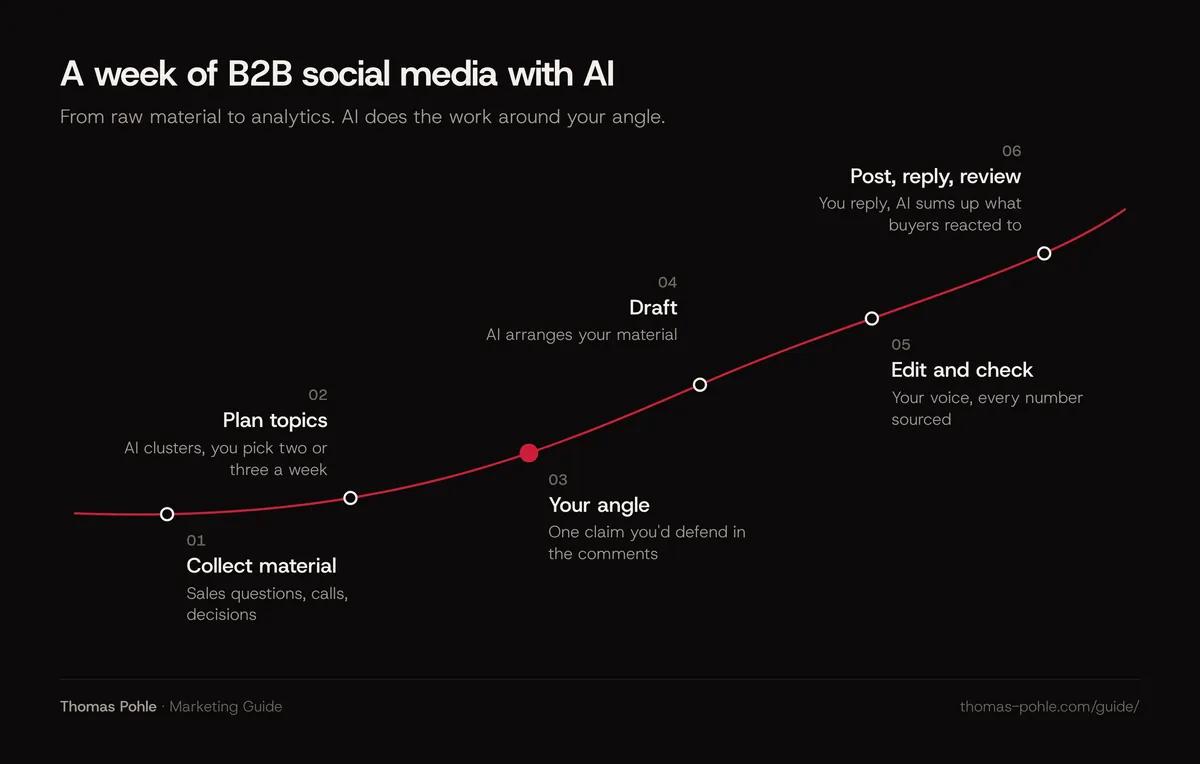
AI saves the most time in the work around the post: planning a month of topics, researching a trend, turning a call transcript into draft angles, proofreading, adapting a post for another format and reading your analytics. None of that work decides what you say. All of it eats hours a small B2B team doesn't have.
- Topic plan. Give it the questions sales heard this month and ask for a four-week plan, one theme per week. For a founder profile I'd plan two to three posts a week, the rhythm described in the guide on LinkedIn for B2B marketing.
- Research. Let it summarize a report and list every claim with its source, so you open the original before you quote anything.
- From material to draft. A customer call transcript (with permission), a meeting note, a voice memo on the way home. AI arranges it. You add the point.
- Variants. A carousel outline, a shorter version for a colleague's profile, a newsletter paragraph. The guide on what AI should do in content marketing covers how to brief AI for longer pieces.
- Analysis. Export your post analytics and ask which topics drew comments from the roles you sell to. In my view, a comment from a buyer tells you more than a pile of likes from peers.
- Proofreading. Spelling, length, a clearer first line. That's the job LinkedIn's own new writing tools are built for.
Which parts of a post should never come from ChatGPT?
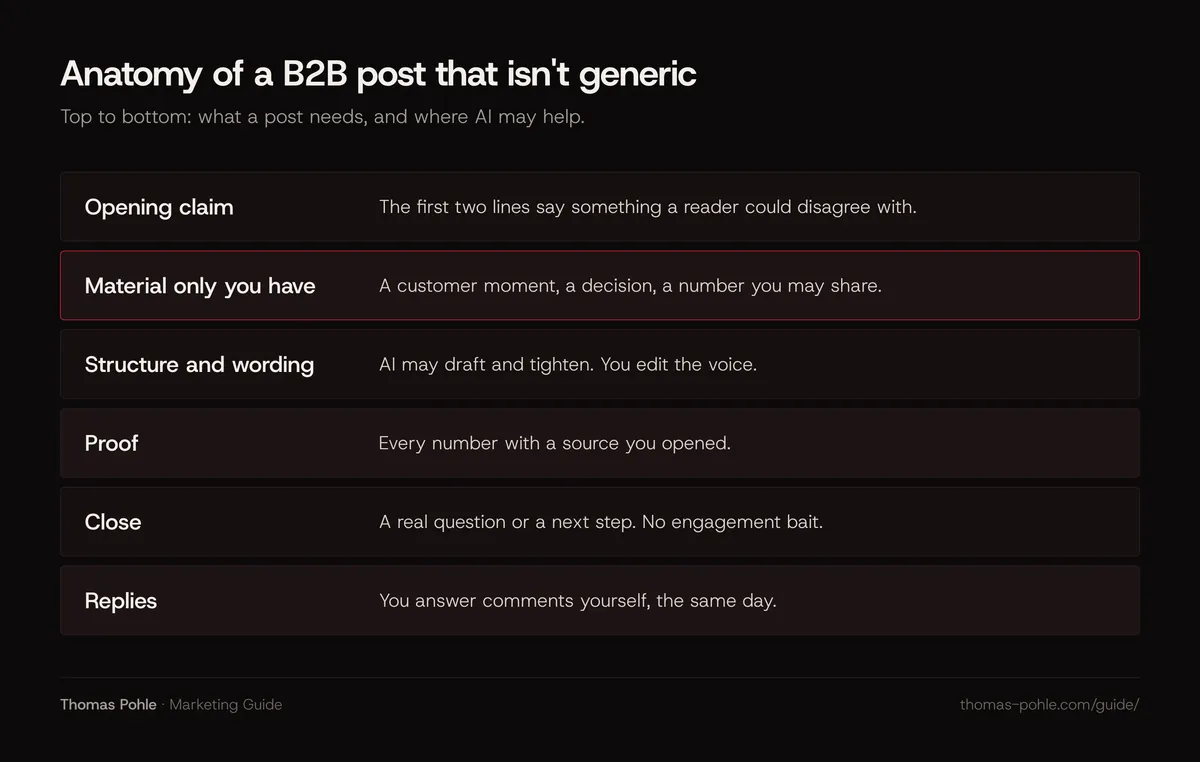
Four parts stay with you: the angle, the experience, the opinion and the conversation afterwards. They're what readers follow you for, and a model can't know them. A post without them is a summary of what's already out there. LinkedIn's definition of AI slop describes exactly that: polished, without a clear point of view.
- The angle. The one claim of the post, in a sentence you'd defend in the comments.
- The experience. What happened at a customer, in a project, in your company. A model can only invent it, and an invented story is the most expensive mistake a personal profile can make.
- The opinion. Where you disagree with the usual advice, and why.
- The replies. Comments are where B2B relationships start. Automating them breaks LinkedIn's User Agreement and, in my view, the reason to be there at all.
Images follow the same logic. My view: real, slightly rough pictures often beat polished graphics on LinkedIn, because they feel like a real moment. An AI image of a team event that never happened is the opposite of that.
How do you test a post for generic before you publish?
Run six checks before every AI-assisted post. Each one has a threshold, so the answer is yes or no. A post that fails one gets fixed or doesn't go out. These thresholds are my working rules. They follow LinkedIn's published definitions and the way I write, not a study.
| Check | Threshold to publish | Why |
|---|---|---|
| Own material | At least one detail from your company, a customer or your own work that no competitor could write | LinkedIn asks that content reflect your own perspective and experience |
| Point of view | The first two lines state a claim someone could disagree with | LinkedIn defines AI slop as lacking a clear point of view |
| Numbers | Every number traced to a source you opened | Models produce confident numbers in finished sentences |
| Phrases | Zero phrases from your banned list | Stock phrasing is the first sign of a template post |
| Engagement bait | No "comment YES" or "agree?" prompts | LinkedIn said in March 2026 it reduces engagement bait |
| Replies | You'll answer comments yourself, the same day | Automated comments break the User Agreement |
One more habit: read the post out loud. If it sounds like a press release, or like a person you've never met, rewrite the first two lines. And watch your post analytics. LinkedIn says that when a post receives enough AI slop reports, the author may see a message about it there. Treat it as a signal about your process.
Should you say when AI helped with a post?
Say it when AI substantially shaped the post. If AI only did the craft around your own writing, there's usually nothing worth disclosing. LinkedIn suggests telling readers when AI substantially shaped a post. Research shows the trade-off: disclosing AI use lowers trust, and hidden AI use that comes out later lowers it most.
The research is solid. Oliver Schilke and Martin Reimann ran 13 experiments with more than 5,000 participants, published in Organizational Behavior and Human Decision Processes in 2025. People who disclosed that they had used AI were trusted less. People whose quiet AI use was uncovered by others saw the steepest drop.
My conclusion: the way out of that dilemma isn't hiding. It's using AI for the parts nobody expects you to disclose, such as planning, proofreading and analysis, and writing the substance yourself.
Images, audio and video have their own legal rule. Under Article 50(4) of the EU AI Act, which applies from 2 August 2026, deployers who publish deep fakes must disclose that the content was artificially generated or manipulated. The Act defines a deep fake as AI-generated or manipulated image, audio or video content that resembles existing persons, objects, places, entities or events and would falsely appear to a person to be authentic or truthful. For AI-generated text, the duty covers text published to inform the public on matters of public interest, with an exception for text that went through human review and for which someone holds editorial responsibility. How this applies to your company is a question for your counsel. This isn't legal advice.
How do you measure whether AI-assisted posts work?
Compare like with like for a quarter. Tag every post as AI-drafted, AI-edited or written by hand, then compare comments from people in your target roles, profile visits and conversations that started from a post. Impressions alone mislead, because LinkedIn says its feed now ranks posts by relevance to each member's professional interests.
- Tag. One column in your content plan: AI-drafted, AI-edited, by hand.
- Buyer comments. Count comments from the roles you sell to, not all comments.
- Conversations. Messages, calls and demo requests that mention a post. Ask in every first call where people noticed you.
- Time per post. Before and after AI. If time drops and buyer comments drop with it, the saving isn't one.
- Feedback notes. Any AI slop note in post analytics goes on the agenda of your next content review.
The general assistant your team already pays for covers almost everything above. The guide on which AI tools a B2B marketing team really needs explains how to pick one and what it costs.
What to do this week
- Read your last ten posts and mark the ones that contain material only you have.
- Write a one-page social media rule: what AI may do, what it never does, who approves.
- Collect material for next month: questions sales heard, customer calls, decisions, mistakes, numbers you're allowed to share.
- Run the six-check test on your next three posts before they go out.
- Remove every tool that comments, likes or connects automatically under your name.
- Add a tag column to your content plan and review the comparison after a quarter.
- Write down your disclosure rule for AI-assisted text and AI images.
AI makes the work around a post faster. It can't make you worth following. That part still comes from what you've seen, decided and are willing to defend in the comments. Want help setting up a social media routine your team can actually run? A one-day Momentum Workshop is a good place to start.
Frequently asked questions
Can I use ChatGPT for LinkedIn posts?
Yes, as a writing aid. LinkedIn's help center allows AI assistance, makes you responsible for everything you post and asks you to review, edit and approve it. What LinkedIn limits is the result it calls AI slop: polished, generic posts without a clear point of view. Use ChatGPT on your own material and write the angle yourself.
Does LinkedIn detect AI-generated posts?
LinkedIn says it has built classifiers that spot AI slop and limit its distribution, informed by member reports. It doesn't publish how the classifiers work, and it doesn't say that every AI-assisted post is detected or demoted. Its stated target is low-effort, generic, repetitive content. AI use as such isn't named as the problem.
Are AI tools that comment or like automatically allowed on LinkedIn?
No. LinkedIn's User Agreement prohibits bots or other unauthorized automated methods to create, comment on, like or share posts, or to drive inauthentic engagement. LinkedIn says it catches hundreds of thousands of automated comment attempts every day, and accounts using automation can be restricted. Write your comments yourself.
How often should a B2B founder post on LinkedIn?
My rule of thumb is two to three posts a week on the founder profile, with quality ahead of a fixed schedule. AI helps you keep that rhythm by preparing material, drafts and analysis. It doesn't make a weak post worth publishing just to hit the number. Skip a slot before you post something generic.
Which AI tool is best for B2B social media?
For most B2B teams, the general assistant they already pay for, used with their own material and a written voice guide. Specialist social media tools earn a place mainly for scheduling and analytics. In my view, any tool that automates likes, comments or connection requests is out, because LinkedIn's User Agreement prohibits that kind of automation.
Sources
- LinkedIn Newsroom: How LinkedIn is tackling AI slop (15 September 2026)
- LinkedIn Newsroom: How LinkedIn is improving the Feed to show more relevant, authentic professional content (12 March 2026)
- LinkedIn Help: Best practices for content created with the help of AI
- LinkedIn User Agreement (effective 3 November 2025), section 8.2
- Schilke and Reimann (2025): The transparency dilemma. How AI disclosure erodes trust. Organizational Behavior and Human Decision Processes 188
- University of Arizona News: Being honest about using AI at work makes people trust you less, research finds (29 May 2025)
- EU AI Act, Article 50: Transparency obligations for providers and deployers of certain AI systems
- Regulation (EU) 2024/1689 (Artificial Intelligence Act), EUR-Lex
- LinkedIn Help: Automated activity on LinkedIn
- Schilke and Reimann (2025), accepted manuscript with Table 1 (sample sizes of all 13 experiments), NSF Public Access Repository

Thomas PohleB2B marketing advisor in Zurich. More than ten years in B2B marketing at Link11, Beekeeper and smino, most recently as Head of Marketing. CEO and co-founder of TEISENDA. Researched and drafted with AI tools, checked against the sources listed above. More about Thomas