Which AI tools does a B2B marketing team really need?

A B2B marketing team needs fewer AI tools than vendors claim. One general AI assistant on a business plan, the AI already built into your office suite and CRM, and a specialist tool only where a measured task proves the assistant falls short. Judge every tool on three criteria: data protection, integration and the real cost per active user.
This guide is for founders and marketing leads facing a long list of AI tools and a team that has already signed up for half of them. The pillar on using AI in marketing without losing quality covers the rules and roles around AI. This one gets concrete: which tools to pay for, how the main assistants compare for business use, and what a small kit costs.
What belongs in an AI base kit for B2B marketing?
An AI base kit for B2B marketing has four layers. One general assistant for research, writing and analysis. The AI inside the office suite where your documents and meetings live. The AI inside your CRM or marketing automation. And at most one or two specialist tools for proven bottlenecks. My take: most teams can stop after the third layer for months.
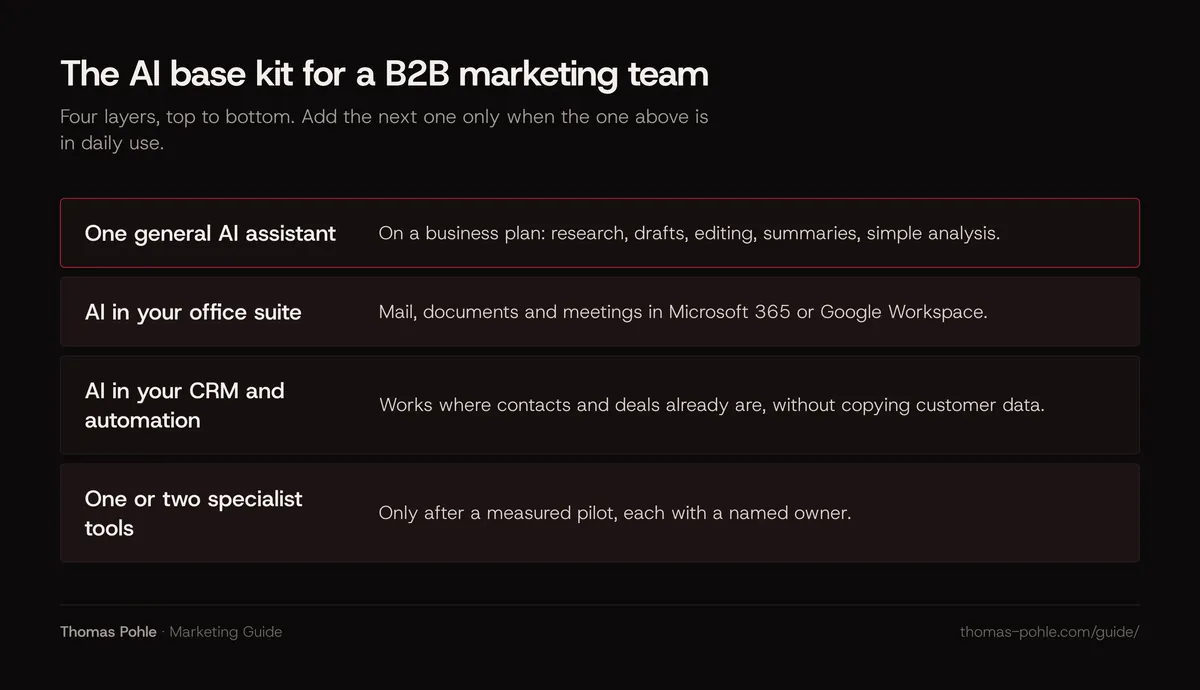
- General assistant. ChatGPT, Claude, Microsoft Copilot or Gemini on a business plan. It covers research, drafts, editing, summaries, translation drafts and simple data analysis.
- Office suite. If your company runs on Microsoft 365 or Google Workspace, AI in mail, documents and meetings may already be included or available as an add-on.
- CRM and automation. AI features inside the system that holds your contacts and deals, so customer data doesn't have to be copied anywhere. The guide on marketing automation covers that system itself.
- Specialists. Image or video production, SEO data, outbound enrichment. Each one only after a pilot, and each with an owner.
The Content Marketing Institute's survey of 1,015 B2B marketers, fielded in summer 2025, shows which AI tools teams already use: 89% name tools for written content, 53% for images and video, 41% for SEO, 38% for social media, 36% for email and 35% for market research. Written content is the job every assistant does. That's why the assistant comes first.
Which AI tool covers which marketing task?
For most marketing tasks, the general assistant is good enough to start. A specialist earns its place only in two cases. The work needs data the assistant doesn't have, such as search volumes or contact data. Or it needs output the assistant can't produce at the quality you need, such as video. The table maps the common tasks.
| Task | Usually covered by | A specialist is worth it when |
|---|---|---|
| Research and briefs | General assistant with web search | You need paid databases or panel data |
| Writing and editing | General assistant | Rarely; a voice guide matters more than a tool |
| Translation EN and DE | General assistant, then a native speaker | You translate large volumes every week |
| Meeting notes and summaries | Office suite AI | Your suite has no meeting AI |
| Images and graphics | General assistant | You produce ads or visuals weekly |
| Video | Specialist tool | Video is a planned channel with an owner |
| SEO research | SEO tool you already use | You need keyword data the assistant cannot see |
| Outbound and account research | CRM AI plus assistant | You run outbound at volume with enrichment data |
| Reporting | Assistant on exported data, CRM reports | Data comes from many sources every week |
Every row shows the same pattern. Specialists sell data or a format. Need neither? Then the assistant you already pay for does the job.
Should your team use ChatGPT, Claude, Copilot or Gemini?
For a B2B marketing team, the four big assistants are close enough in writing quality that one question decides: where does your work live? On Microsoft 365, Copilot sits in Word, Outlook and Teams. On Google Workspace, Gemini sits in Gmail, Docs and Meet. ChatGPT and Claude work across both through connectors.
| Plan | List price per user and month | Training on your content | Check before buying |
|---|---|---|---|
| ChatGPT Business | $20 billed annually, $25 monthly | No, by default | Data residency is listed for Enterprise only |
| Claude Team | $20 billed annually, $25 monthly | No, by default | Plan is for teams of 2 to 150; check the connectors you need |
| Microsoft 365 Copilot Business | $21 list, $18 promotional, billed annually | No, per Microsoft | Requires a Microsoft 365 business plan |
| Gemini in Google Workspace | Included in Business Standard and higher | No, without your permission | Starter plan lacks Gemini in Docs, Sheets, Drive and Meet |
Three details matter for DACH companies. OpenAI's pricing page lists data residency in the EU and other regions as an Enterprise feature. Business doesn't get it. Microsoft says EU traffic for Copilot stays within its EU Data Boundary, with the exception of models provided by Anthropic as a subprocessor. Google says interactions with Gemini stay within your organization and that prompts count as customer data under its Cloud Data Processing Addendum.
My advice: pick one assistant for the whole team. Two assistants for everyone double the cost and split prompts, examples and rules across two places.
How do you check data protection before you buy an AI tool?
Check four things in writing before anyone enters company data. Is there a data processing agreement? Are your inputs used for model training? Where is data stored and processed? Can an admin manage users and delete data? If a tool's documentation can't answer these questions, it stays out of the kit.
- Processing agreement. Article 28 of the GDPR requires a contract or other binding legal act with any processor that handles personal data on your behalf. Check that your plan comes with one and that it's accepted or signed. My view: free consumer accounts aren't set up for this role.
- Training. Look for an explicit statement that business content isn't used for training by default, as OpenAI, Anthropic, Microsoft and Google make for the plans above.
- Location. Where data is processed, and whether that fits your customer contracts.
- Admin control. Central user management, single sign-on and the ability to remove a user and their data.
In Switzerland, the Federal Data Protection and Information Commissioner (FDPIC) states that the current Data Protection Act applies directly to AI-based data processing, because the law is technology neutral. It also requires transparency about purpose, functioning and data sources. The guide on starting with AI in B2B marketing explains what GDPR and the Swiss FADP mean for marketing use cases. None of this is legal advice. Ask your data protection contact or counsel.
Here's my view: the biggest risk usually isn't the tool you buy. It's the private account someone uses because nobody bought one. A paid business seat is cheap compared with customer data in a consumer tool without a contract.
How do you check whether an AI tool fits your stack?
An AI tool fits your stack when it reads from and writes to the systems where your content, contacts and meetings already are. If people have to copy text and customer data into a separate window and back, the tool adds work and risk. So check connectors, single sign-on and where the output ends up. Features come after.
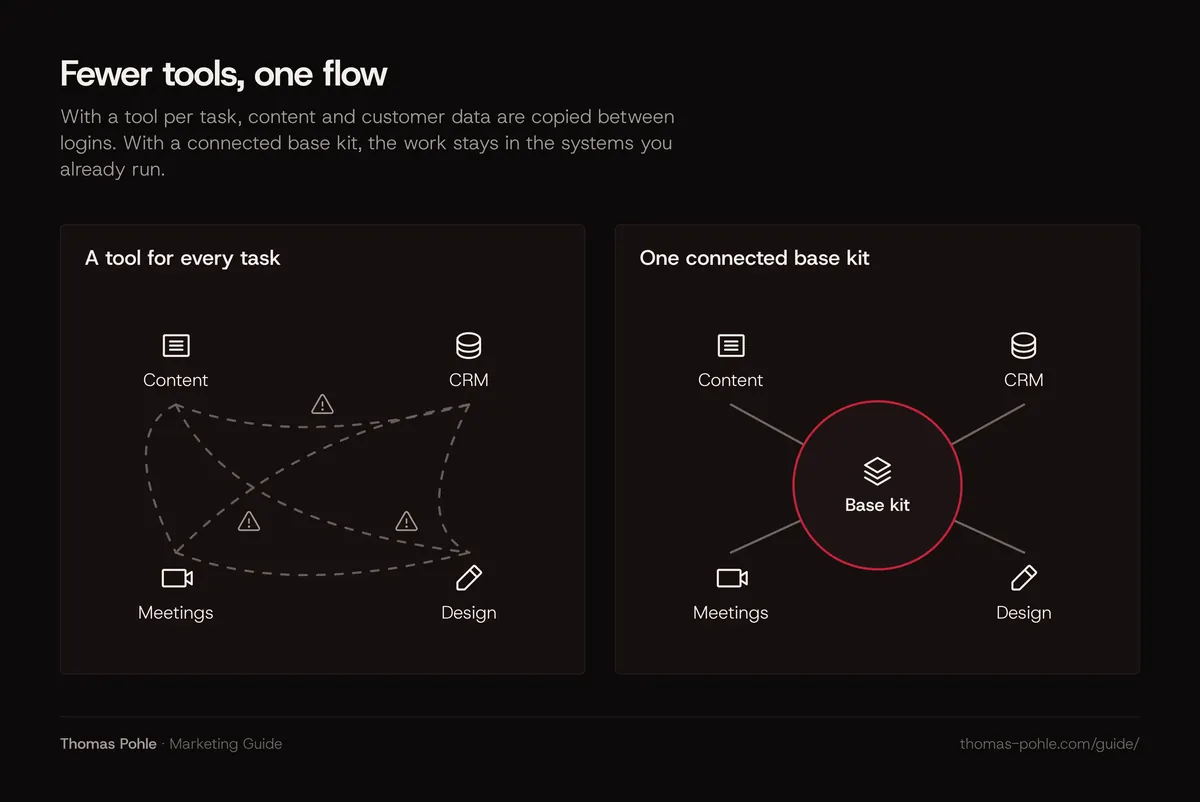
My take: AI should take complexity out of marketing work. A new tool that adds a login, a dashboard and one more copy of your content does the opposite. The stack I work with includes Salesforce and HubSpot as CRMs, Apollo, Lemlist and Clay for outbound, Leadinfo for website visitor data, Adobe Creative Suite and the major AI assistants. My test for anything new: where does it plug into that stack?
Ask these in every demo:
- Which of our systems does it connect to natively, and does the connection read, write or both?
- Does it support single sign-on with our identity provider?
- Where does the output end up, and who can find it next month?
- Can we export our data and prompts if we leave?
What does an AI tool stack cost per user?
A base kit for a small B2B marketing team costs roughly 20 to 25 US dollars per user and month for the assistant at current list prices, plus any specialist seats. The number that matters is cost per active user. A seat nobody uses every week raises the real price of every seat that does get used.
A typical scenario, with list prices from the table above and a team invented for the example: six people in marketing, and the company runs on Microsoft 365.
| Option | Monthly cost | Yearly cost |
|---|---|---|
| Copilot Business for all six, at $21 list | $126 | $1,512 |
| ChatGPT Business for all six, billed annually | $120 | $1,440 |
| Both assistants for all six | $246 | $2,952 |
| ChatGPT Business, only four of six use it weekly | $30 per active user | $360 per active user |
The arithmetic makes two points. Running two assistants side by side roughly doubles the cost without doubling the use. And the last row shows why inactive seats matter more than the list price: two unused seats make every used seat 50% more expensive.
My rule of thumb: review seat usage every month and give back any seat that hasn't been used for 30 days. Your vendor's admin console usually shows the activity.
When is a specialist AI tool worth adding?
Add a specialist AI tool only when four conditions hold. The general assistant failed on the task in a measured pilot. The task comes up every week. The tool connects to the system where the output belongs. And the vendor passes the data protection check. If one condition is missing, wait.
The thresholds I'd use. They're rules of thumb, not research findings:
- Measured gap. Two weeks of the task with the general assistant, with time and corrections written down. The specialist must clearly beat it on the same task.
- Frequency. At least weekly. A monthly task rarely justifies a monthly seat.
- Owner. One named person who uses it, maintains the prompts and decides on renewal.
- Exit. You can export your work and cancel within a month.
- Total count. If the kit grows beyond the assistant, the suite, the CRM and two specialists, review all of them before adding another.
What to do this week
- List every AI tool anyone in marketing uses, paid or free, including private accounts.
- Mark which of them hold company or customer data, and whether a processing agreement exists for each.
- Decide on one general assistant for the team, based on where your documents and meetings live.
- Check which AI features your office suite and CRM already include before buying anything new.
- Calculate the cost per active user for every paid AI seat, using the admin console's activity data.
- Give back seats unused for 30 days and cancel tools nobody owns.
- Pick one task where a specialist might help and run a two-week pilot against the assistant.
The best AI kit is the smallest one your team actually uses every day. Want help choosing it and setting it up with your team? A one-day Momentum Workshop is built for exactly that decision.
Frequently asked questions
Is ChatGPT enough for a B2B marketing team?
For many small teams, a business plan of one general assistant covers most daily work: research, drafts, editing, summaries and simple analysis. It falls short where you need data it doesn't have, such as keyword volumes or contact data, and for some formats like video. Start with the assistant alone. Measure where it fails. Add a specialist only there.
Can we use free AI tools for marketing?
For tasks without company or customer data, often yes. The moment personal data or confidential material goes in, you need a contract that covers data processing and a clear statement on model training. Free consumer accounts are rarely set up for that. My take: a paid business seat is the cheaper option compared with the risk of data in a tool without a contract.
Copilot or ChatGPT: which is better for marketing?
Neither wins in general. Copilot is the natural choice if your team works in Word, Outlook and Teams every day, because it reaches those documents and meetings directly. ChatGPT Business works across Microsoft and Google tools through connectors and costs about the same per user at current list prices. Pick the one that fits where your work lives. Then train the team on that one tool.
Which AI tools suit B2B marketing in Switzerland and Germany?
The same tools as elsewhere, chosen with stricter data checks. Look for a data processing agreement, a statement that business content isn't used for training, and clear information on where data is processed. Microsoft documents an EU Data Boundary for Copilot. OpenAI lists data residency for Enterprise plans. Under the Swiss FADP and the GDPR, existing data protection rules apply to AI tools.
How many AI tools should a marketing team use?
As few as cover the work. My rule of thumb: one general assistant, the AI in your office suite and CRM, and at most two specialist tools, each with a named owner. More tools mean more logins, more places where content lives and more contracts to check. Review the whole kit before you add a sixth piece.
Sources
- OpenAI: ChatGPT Business and Enterprise pricing
- Anthropic: Claude pricing (Team and Enterprise)
- Microsoft: Microsoft Copilot for small business, pricing
- Microsoft Learn: Data, privacy, and security for Microsoft Copilot
- Google Workspace: Compare pricing plans
- Google Workspace: Generative AI in Google Workspace Privacy Hub
- Content Marketing Institute: B2B Content and Marketing Trends, Insights for 2026
- Regulation (EU) 2016/679 (GDPR), Article 28: Processor
- FDPIC (EDÖB): Update, current data protection law is directly applicable to AI

Thomas PohleB2B marketing advisor in Zurich. More than ten years in B2B marketing at Link11, Beekeeper and smino, most recently as Head of Marketing. CEO and co-founder of TEISENDA. Researched and drafted with AI tools, checked against the sources listed above. More about Thomas